Run five moves this week and most S3 bills drop substantially: turn on Storage Lens, add lifecycle rules for logs and backups, abort incomplete multipart uploads after a short period, apply Intelligent-Tiering to unpredictable datasets larger than a minimum size, and cut request and egress costs with CloudFront or a VPC gateway endpoint. Start with Storage Lens. It tells you which buckets are actually bleeding money before you touch a single lifecycle policy.
TL;DR:
- Running Storage Lens for at least two weeks helps identify cold buckets and prevents premature tier transitions that could incur costly retrieval fees.
- Transitioning only inactive logs, backups, and temp data after analyzing real access patterns avoids unnecessary storage costs and early-deletion penalties.
- Minimizing LIST requests through event-driven notifications, batching objects, and caching content with CloudFront significantly reduces request and data transfer costs.
- Restrict cross-region replication to critical data with prefix or tag filters, choosing cost-effective storage classes for destination buckets to avoid unnecessary expenses.
- Compressing data formats like Parquet or ORC cuts storage and query costs, while KMS-encrypted objects should be batched to control encryption API charges.
Table of Contents
- What are the fastest s3 cost optimization wins to run first?
- Which s3 storage class fits which workload?
- How do you use Storage Lens before automating lifecycle rules?
- Why do requests and data transfer cost more than storage?
- How do you clean up hidden S3 storage costs?
- How do you verify S3 savings actually stuck?
- How does Cost Beacon approach an S3 cost audit?
- How do you cut cross-region replication costs?
- When does S3 Transfer Acceleration actually pay off?
- How do S3-compatible alternatives compare on cost?
- Do compression and encryption change your S3 bill?
- Can you combine S3 savings with Reserved Capacity or Savings Plans?
- What surprises teams most during an S3 cost review?
- Get a pay-on-savings S3 audit from Cost Beacon
- Where to read the primary AWS documentation
- Sources
What are the fastest s3 cost optimization wins to run first?
Work this list in order. Each item is something you can execute in an afternoon, and most compound with the next one.
- Turn on S3 Storage Lens and check the cost-optimization metrics dashboard for buckets with no lifecycle rules, high noncurrent-version bytes, or incomplete multipart uploads older than 7 days.
- Add lifecycle transitions and expirations for logs, backups, and temp data. Most teams find years of log data sitting in Standard that nobody has queried in months.
- Enable an abort-incomplete-multipart-upload rule set to 7 days. Failed uploads leave orphaned parts that bill forever until you delete them.
- Turn on Intelligent-Tiering for datasets larger than 128 KB with unpredictable access. Use manual lifecycle rules instead for data with a known, predictable access curve.
- Expire or transition noncurrent versions on versioned buckets. Version bloat is one of the single largest hidden costs in S3.
- Stop LIST polling. Consolidate small objects and switch scanning jobs to event-driven triggers using S3 event notifications.
- Put CloudFront in front of public content and add a VPC Gateway Endpoint for regional compute-to-S3 traffic.
- Tag every bucket by owner and team, then set AWS Budgets alerts so cost regressions get caught in days, not quarters.
Pro Tip: Run Storage Lens for at least two weeks before writing a single lifecycle rule. Buckets that look “cold” on day one sometimes get a monthly batch job that touches every object, and a premature transition to a cheaper tier can trigger retrieval fees that erase the savings.
Which s3 storage class fits which workload?
Picking the wrong storage class is the most common way teams sabotage their own s3 cost optimization efforts. Each class trades price for retrieval speed, minimum storage duration, and minimum billable object size, and those parameters decide the correct choice more than raw per-GB price does.
- S3 Standard for anything accessed frequently, no minimum duration, highest per-GB price.
- S3 Intelligent-Tiering for unpredictable or unknown access patterns, moves objects automatically between tiers, adds a small per-object monitoring fee.
- S3 Standard-IA for data accessed monthly or less, 30-day minimum storage duration, cheaper storage but per-GB retrieval fees.
- S3 One Zone-IA for recreatable, non-critical data that doesn’t need multi-AZ redundancy, roughly 20% cheaper than Standard-IA.
- S3 Glacier Instant Retrieval / Flexible Retrieval / Deep Archive for archival data, 90 to 180-day minimums, Deep Archive runs around 1/25th the cost of Standard but locks you into a 180-day minimum.
- S3 Express One Zone for latency-sensitive workloads that need single-digit millisecond access, priced at a premium over Standard.
Here is the early-deletion trap: move an object to Glacier Deep Archive, then delete it before the required minimum duration, and AWS bills you for the full minimum retention period anyway. On archival-tier storage, that early-deletion penalty can easily exceed what you would have paid just leaving the object in Standard-IA. The same math applies to minimum object size. Storage classes with a 128 KB billing floor charge you for at least 128 KB per object, so storing many tiny log fragments in an IA tier can cost more than in Standard. Batch small files before transitioning them.
How do you use Storage Lens before automating lifecycle rules?
Run an experiment before you automate anything at scale. Blindly applying lifecycle rules or Intelligent-Tiering without checking real access patterns risks retrieval fees or missed savings that can outweigh the benefit entirely.
- Pull Storage Class Analysis on a representative sample of buckets, not your whole account, and let it run 30 to 90 days to capture real access curves rather than a snapshot.
- Cross-reference with Storage Lens metrics for bytes by storage class, noncurrent version bytes, and incomplete multipart upload counts, since the advanced tier adds prefix-level detail that the free tier misses.
- Build your breakeven math with three line items: the new storage rate, the retrieval or monitoring fee, and the one-time transition fee for moving large object counts, since transitioning millions of objects at once can add a noticeable one-time cost.
- Set transition thresholds by data type: application logs at 30 days to IA, compliance backups at 90 days to Glacier, partitioned analytics data at 60 days once query frequency drops off in your Storage Class Analysis report.
Pro Tip: Stage large transitions through S3 Batch Operations instead of one giant lifecycle sweep. It spreads the one-time transition fee and gives you a rollback point if the access pattern assumption turns out wrong.
Why do requests and data transfer cost more than storage?
Storage is rarely the biggest line item once an application scales. Request patterns and egress traffic frequently dominate the bill, and the fix usually starts with separating storage-dominant buckets from request-dominant workloads in your first audit pass.
- LIST requests cost roughly 12.5 times what a GET request costs, and a service that polls a bucket with LIST calls across many prefixes on a tight interval can generate a surprisingly large monthly bill on its own.
- Replace polling with event-driven ingest. S3 event notifications trigger Lambda or SQS the moment an object lands, eliminating the need to scan for new files.
- Batch small objects into larger ones wherever the engineering cost is reasonable. Fewer, larger objects mean fewer requests and lower per-object billing floors.
- Put CloudFront in front of anything public. Origin traffic from S3 to CloudFront doesn’t incur S3 data transfer charges, and cached responses cut both egress and request counts.
- Add a VPC Gateway Endpoint for same-region compute talking to S3. Without one, that traffic can route through a NAT gateway and pick up per-GB NAT processing charges that have nothing to do with S3 pricing at all.
Classifying access logs with Athena is the fastest way to find which specific requests are driving egress, down to the CIDR range or origin.
How do you clean up hidden S3 storage costs?
Housekeeping items rarely show up on anyone’s roadmap, which is exactly why they accumulate for years.
- Enable the abort-incomplete-multipart-upload rule at 7 days on every bucket. Interrupted uploads leave orphaned parts that bill indefinitely until deleted, and most teams have never checked for them.
- Pair versioning with a noncurrent version expiration rule. Versioned buckets without one keep every prior copy forever at full Standard pricing.
- Use S3 Batch Operations for large-scale expirations or transitions instead of custom scripts. It handles retries, reporting, and throttling automatically.
- Add AWS Config rules and CloudWatch alarms to catch drift, such as a new bucket created without lifecycle rules or versioning enabled without an expiration policy.
How do you verify S3 savings actually stuck?
Prove the change worked before declaring victory. Capture a baseline first: Storage Lens metrics by storage class, Cost Explorer usage types for S3, and Cost and Usage Report (CUR) line items for data transfer, all pulled before you touch a single setting.
- Compare storage, request, and transfer costs separately pre- and post-change, since a win on storage can hide a regression on requests.
- Set AWS Budgets alarms scoped to the S3 service so a misconfigured lifecycle rule gets flagged in days.
- Test object restores from any archive tier before rolling a transition out account-wide, and confirm retrieval latency doesn’t break an SLA.
- Re-run Storage Lens 30 days post-change to confirm the cold-data assumption held.
| Metric to capture | Tool | What it proves |
|---|---|---|
| Bytes by storage class | S3 Storage Lens | Storage tier savings are real |
| S3 usage types | Cost Explorer | Cost trend by operation type |
| Data transfer by destination | Cost and Usage Report | Egress reduction actually happened |
| Request counts | CloudWatch / Storage Lens | LIST/GET/PUT changes post-fix |
How does Cost Beacon approach an S3 cost audit?
Cost Beacon runs AI-driven analytics against your account first, then an engineer validates every finding before it hits the report. The output is a prioritized savings plan, ranked by dollar impact, not a generic checklist.
- Typical first-line fixes: incomplete multipart uploads, version bloat, and buckets missing lifecycle rules entirely.
- Clients see an average 32% bill reduction across fintech, telecom, and other industries.
- Pricing is risk-free: pay-on-savings only, no upfront fee, no fee if nothing is found.
- Findings extend past S3 into security posture and broader AWS spend.
How do you cut cross-region replication costs?
Cross-region replication (CRR) charges stack on top of normal storage: a replication fee per GB, standard inter-region data transfer, and full storage costs in the destination region at whatever class you’ve configured there. Running CRR on every object in a bucket “just in case” is one of the more expensive habits engineering teams pick up during a compliance push and never revisit.
Start by asking whether you need CRR at all, or whether same-region replication (SRR) or a Backup and Restore pattern would satisfy the actual requirement. Genuine disaster-recovery and compliance mandates usually justify CRR; a stale habit from an old architecture review usually doesn’t.
When CRR is genuinely required, scope it with filters instead of replicating the whole bucket. Replication rules support prefix and tag filters, so replicate only the objects that actually need cross-region durability, like production data, and exclude test artifacts, temp uploads, and logs that don’t need a second-region copy.
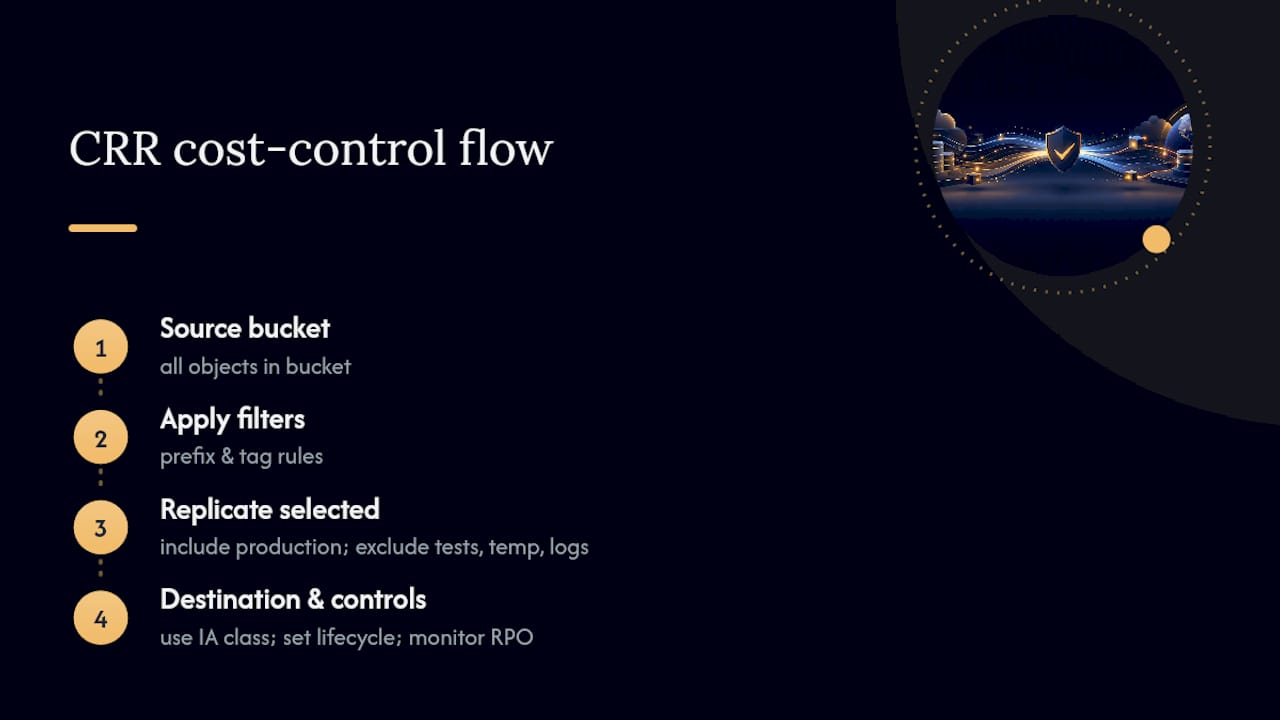
Set the destination storage class deliberately. Replicating into S3 Standard in the destination region when the data is rarely read there wastes money; Standard-IA or One Zone-IA on the destination side often makes more sense for disaster-recovery copies that you hope never to touch. Also apply a lifecycle policy in the destination region independently. Replicated objects don’t automatically inherit the source bucket’s lifecycle behavior unless you configure it there too, so plenty of teams end up with replicated data that ages in expensive tiers forever because nobody set a matching lifecycle rule on the destination.
Finally, monitor replication metrics through S3 Replication Time Control (RTC) or basic CloudWatch replication metrics, and cross-check replicated byte volume against your actual recovery point objective. If your RPO tolerates 24 hours, near-real-time replication for every object is paying for precision you don’t need.
When does S3 Transfer Acceleration actually pay off?
S3 Transfer Acceleration routes uploads through CloudFront’s edge network to speed up long-distance transfers into S3, and it carries an additional per-GB fee on top of standard transfer pricing. That fee only makes financial sense when the speed gain actually matters to your business.
It earns its cost for large-file uploads from geographically distant users, think a media company accepting multi-gigabyte video uploads from contributors on other continents, or a global SaaS product ingesting large customer data exports from users far from your bucket’s region. The latency reduction can be dramatic in those cases, and AWS provides a Transfer Acceleration speed comparison tool to test whether your specific route sees a meaningful gain before you turn it on.
It’s a poor fit for small, frequent objects, uploads that originate close to the bucket’s region already, or batch jobs with no real-time latency requirement. Nightly backup jobs, log shipping, and internal data pipelines almost never need Transfer Acceleration. Test the speed difference for your actual routes first using the comparison tool, since the improvement can be negligible for users already close to the destination region, in which case you’re paying an acceleration fee for a speed gain nobody experiences.
The practical rule: enable Transfer Acceleration selectively, per-bucket or even per-use-case, rather than account-wide. Leaving it on for buckets that don’t need it is a quiet, recurring cost with zero benefit attached.
How do S3-compatible alternatives compare on cost?
Several vendors offer S3-compatible object storage with a similar API surface but a different pricing model, most notably charging little to no egress fee compared to AWS’s standard data transfer pricing. For workloads that are extremely egress-heavy, an S3-compatible alternative can look attractive purely on the transfer line item.
That said, the comparison isn’t just about the per-GB rate. Moving off S3 means giving up native integration with the rest of the AWS ecosystem: Storage Lens, Storage Class Analysis, lifecycle policies, Intelligent-Tiering, IAM-level access controls, VPC Gateway Endpoints, and tight coupling with services like CloudFront, Athena, and Lambda triggers. Teams already running the majority of their compute on AWS often find that the egress savings from switching get eaten by the engineering cost of rebuilding tooling, monitoring, and access patterns around a different API and billing model.
The workloads where S3-compatible alternatives make the most sense are usually egress-dominant and storage-only: static asset hosting for a global audience, backup archives that get pulled in bulk occasionally, or media libraries served directly to end users with heavy download volume and minimal AWS-native processing. If your workload is deeply integrated with Lambda, Athena, Glue, or other AWS-native services that read directly from S3, the switching cost usually outweighs the transfer savings.
The more common answer for teams facing high S3 egress bills isn’t migration. It’s applying the request and transfer fixes already covered here: CloudFront in front of public content, VPC Gateway Endpoints for internal compute traffic, and Athena-based classification of exactly which requests are generating the egress in the first place.
Do compression and encryption change your S3 bill?
Compression reduces your bill directly because S3 storage and transfer costs are billed by the byte. Compressing logs, backups, and text-heavy data before upload, using formats like gzip or Parquet for analytics data, routinely shrinks storage footprint by 70% or more depending on the data type, and every gigabyte you don’t store or transfer is a gigabyte you don’t pay for.
Columnar formats compound the savings further. Converting flat CSV or JSON logs into Parquet or ORC before storing them in S3 not only compresses better, it also reduces the bytes scanned by Athena or Redshift Spectrum queries against that data, which lowers query costs alongside storage costs.
Encryption is a different story. Server-side encryption with S3-managed keys (SSE-S3) carries no additional charge. Server-side encryption with AWS KMS-managed keys (SSE-KMS) does add cost, but it comes from KMS API request pricing, not from S3 storage or transfer rates. High-frequency small-object workloads encrypted with SSE-KMS can rack up meaningful KMS request charges purely from the volume of encrypt and decrypt calls, even though the S3 storage bill itself doesn’t change.
The practical guidance: use SSE-S3 by default unless a compliance requirement specifically mandates customer-managed keys through KMS. When KMS is required, batch operations where possible to reduce the number of discrete API calls, and factor the KMS request volume into your cost model separately from your S3 storage optimization, since it’s a genuinely different line item with its own pricing.
Can you combine S3 savings with Reserved Capacity or Savings Plans?
S3 doesn’t have its own Reserved Instance or Savings Plan mechanism the way EC2 or RDS do. There’s no upfront commitment product that discounts S3 storage rates directly. But that doesn’t mean S3 cost optimization and Reserved Capacity strategies live in separate silos.
The real synergy shows up in workloads that mix compute and storage. A data pipeline running on EC2 or Fargate that reads and writes heavily to S3 benefits from Compute Savings Plans on the compute side, while the S3 side gets optimized through the levers already covered here, lifecycle rules, Intelligent-Tiering, and request reduction. Optimize both independently and the combined bill drops on two fronts instead of one.

There’s also S3 Storage Lens itself, which is included at no charge for the free-tier metrics, meaning you get baseline cost-optimization visibility without any capacity commitment at all. The advanced tier of Storage Lens does carry a cost, so weigh that against the account size and complexity you’re managing before enabling it broadly.
For teams running consistently large data volumes with predictable growth, negotiating an Enterprise Discount Program (EDP) or Private Pricing Agreement with AWS can extend beyond compute into overall spend commitments that indirectly benefit S3-heavy workloads, though the specific terms vary by account size and are negotiated directly with AWS, not something to assume applies universally.
The bottom line: treat S3 cost optimization as its own workstream running in parallel with any Reserved Capacity or Savings Plan strategy on the compute side. They don’t conflict, but they also don’t substitute for each other.
What surprises teams most during an S3 cost review?
Version bloat catches almost everyone off guard. Versioning gets turned on for safety during a compliance review, nobody pairs it with an expiration rule, and eighteen months later a bucket is quietly paying full Standard rates on terabytes of noncurrent versions nobody will ever restore.
Polling is the second recurring surprise. A cron job doing a LIST call against a bucket every few minutes looks harmless in code review, and looks very different on a bill once you know LIST costs roughly 12.5 times what GET does.
Most teams see measurable savings within days of enabling Storage Lens and adding the abort-multipart rule; the tiny-file consolidation work takes longer, usually two to four weeks. One recent account review found six figures in orphaned multipart uploads sitting untouched for over a year. That’s a placeholder pattern worth checking in your own account today.
— Aaditya Parashar
Get a pay-on-savings S3 audit from Cost Beacon
Cost Beacon is the alternative to guessing your way through lifecycle rules and Storage Lens dashboards on your own time. Our engineers pair AI-driven analytics with hands-on validation to find the fixes that actually move your bill: incomplete multipart uploads sitting for months, version bloat nobody flagged, buckets with no lifecycle rules at all, and request patterns quietly driving egress costs up.
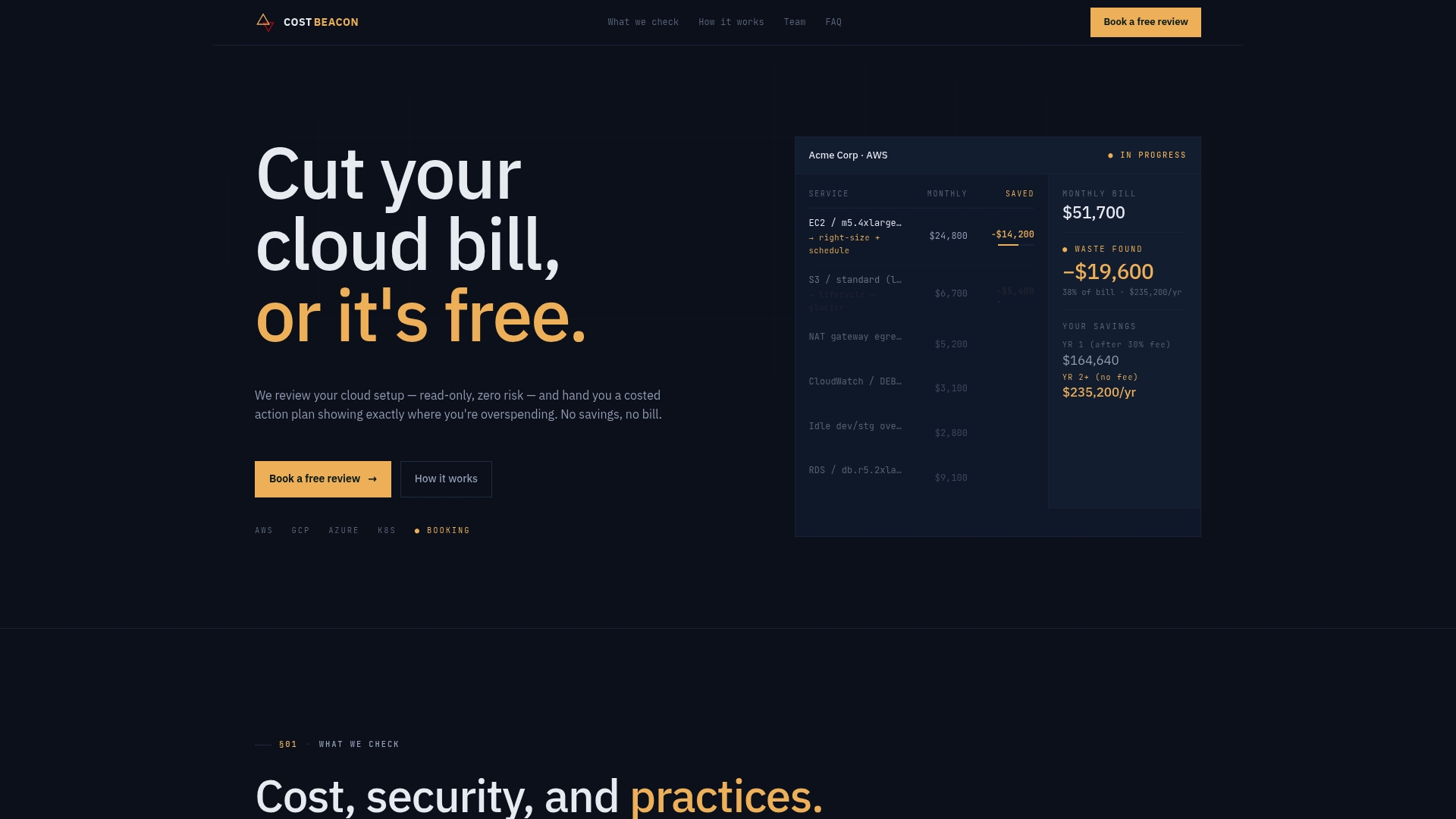
You pay nothing upfront, and you only pay a fee based on savings we actually realize for you. If we don’t find meaningful savings, you owe us nothing. If your S3 spend has been climbing and you’d rather have engineers confirm the fixes than guess at lifecycle thresholds yourself, request a savings estimate from Cost Beacon and see what a prioritized action plan looks like for your account.
Where to read the primary AWS documentation
- S3 cost optimization overview — AWS
- S3 storage classes guide — AWS docs
- Using Storage Lens to optimize costs — AWS docs
- Classifying data transfer costs with Athena — AWS blog
Sources
Aaditya works on cloud cost and platform engineering at Cost Beacon, mostly on AWS and Kubernetes estates that grew faster than anyone planned for.
 Cost Beacon