Multi-cloud cost management works best when you unify billing data across providers, run it through a FinOps lifecycle, and automate the repeatable fixes instead of relitigating them every month. That combination is what turns cloud spend from a monthly surprise into a forecastable line item. Teams that get this right typically start with AWS, since it usually carries the largest share of spend and the richest native tooling, then extend the same model to Azure and GCP. The result: predictable budgets, measurable savings, and no performance hit.
TL;DR:
- Prioritizing the collection of detailed billing data and normalizing it into a shared schema is crucial for accurate multi-cloud cost management.
- Continuous visibility, governance, and automated policies are essential to sustain cost improvements and prevent waste reaccumulation.
- Idle resources, over-provisioned compute, and untagged assets account for 25% to 35% of cloud spend and are the primary areas for quick savings.
- Managing data transfer costs requires deliberate architecture decisions, such as colocating data and batching cross-cloud transfers, to prevent unexpected expenses.
- Third-party tools can enhance visibility and anomaly detection but should supplement, not replace, disciplined tagging and ongoing manual review efforts.
Table of Contents
- What does multi-cloud cost management actually mean?
- How do you build a single source of truth for cloud spend?
- What is the FinOps lifecycle and who owns it?
- Which rightsizing and automation tactics reclaim the most waste?
- How do AI, GPU, and Kubernetes costs behave differently?
- Which KPIs and reports keep multi-cloud budgets predictable?
- What does a realistic 90-to-180-day rollout look like?
- What should you expect from a professional cloud cost audit?
- How do AWS, Azure, and GCP pricing models actually compare?
- Are third-party multi-cloud cost tools worth adding?
- Why does data transfer and network egress cost so much across clouds?
- How do you reconcile currency and billing differences between providers?
- How do you keep tagging consistent across every cloud you use?
- An engineer’s take on what actually moves the needle
- How Cost Beacon turns this roadmap into realized savings
- Sources
What does multi-cloud cost management actually mean?
Cost management and cost optimization get used interchangeably, but they aren’t the same job. Cost management is the ongoing discipline of tracking, allocating, and forecasting spend across every provider you use. Cost optimization is the narrower work of reducing that spend without hurting performance, through rightsizing, commitments, or architecture changes. You need both, but they run on different clocks: management is continuous, optimization is iterative.
Multi-cloud makes this harder because AWS, Azure, and GCP don’t speak the same billing language. AWS bills in on-demand hourly rates with Savings Plans and Reserved Instances layered on top. Azure uses a similar reserved-instance model but structures its billing exports differently. GCP applies automatic sustained-use discounts alongside Committed Use Discounts (CUDs). Each provider also ships its own recommender, a native tool that flags rightsizing and idle-resource opportunities inside its own console, but none of them talk to each other.
A shared vocabulary keeps IT and finance on the same page:
- Allocation — mapping every dollar of spend to an owner, team, or product line.
- Showback — reporting allocated costs to teams without actually charging them internally.
- Chargeback — billing those costs back to the owning team’s budget.
- Rightsizing — matching instance or resource size to actual utilization.
- Commitments — prepaid discount instruments like AWS Savings Plans, Azure Reserved VM Instances, or GCP CUDs.
Gartner projects worldwide public cloud end-user spending will hit $723 billion in 2025, which is why even a few percentage points of waste translates into real budget damage at scale.
How do you build a single source of truth for cloud spend?
You can’t manage what you can’t see in one place. The technical flow that works reliably across providers looks like this:
- Pull raw billing exports from each provider. On AWS, that means enabling Cost and Usage Reports (CUR), which deliver line-item detail down to the resource ID, usage type, and applied discount. Azure and GCP have their own export mechanisms, but the granularity varies, so document the gaps early.
- Normalize into a shared schema. Rename fields so “instance type” on AWS lines up with “VM size” on Azure and “machine type” on GCP. Without this step, every downstream report requires manual translation.
- Load into a data warehouse or FinOps hub. Many teams land data in a warehouse and layer a FinOps hub or BI tool on top for querying and dashboards.
- Apply tags and virtual tags. Real tags come from resource metadata; virtual tags are rules you define to categorize spend that was never tagged at creation, like shared networking or a data transfer line item with no clear owner.
- Reconcile against invoices monthly. Discounts, credits, and support fees often post separately from usage data, so your normalized dataset needs a reconciliation step or your totals won’t match what finance sees on the invoice.
For AWS specifically, prioritize collecting the CUR fields for resourceId, usageType, lineItemType, and savingsPlanArn from the start. Retrofitting tag and field collection after 12 months of untagged spend is far more painful than enforcing it at resource creation.
What is the FinOps lifecycle and who owns it?
The FinOps lifecycle runs in three repeating phases: inform, optimize, and operate. This isn’t a one-time project, it’s a continuous loop, and the FinOps Foundation’s community practices treat it as the baseline operating model for any organization running more than one cloud.
Inform means giving every stakeholder visibility into their share of spend, in near real time, broken down by team, product, and environment. The deliverable here is a shared dashboard, not a monthly spreadsheet email.
Optimize means acting on that visibility: rightsizing, buying commitments, cleaning up idle resources. The deliverable is a prioritized backlog of savings opportunities with an owner and a dollar estimate attached to each one.
Operate means making the first two phases permanent through governance, budgets, and automated policy enforcement. The deliverable is a set of guardrails that prevent the same waste from reappearing next quarter.
A functioning FinOps team usually includes:
- A FinOps lead who owns reporting and cross-team coordination.
- Engineering owners who execute rightsizing and cleanup within their own services.
- A finance partner who validates forecasts against actual invoices.
- A governance board that approves commitment purchases and policy changes.
Cloud cost work fails most often when it stays siloed inside IT or finance instead of running as a joint operating model, according to Microsoft’s guidance on cloud cost optimization principles.
Pro Tip: Give engineering teams a weekly, not monthly, view of their own cost trend. By the time a monthly report lands, the workload that caused the spike may already be gone, and nobody remembers why.
Which rightsizing and automation tactics reclaim the most waste?
Idle and over-provisioned resources are the single biggest recoverable category in most cloud estates. Industry estimates put typical IaaS and PaaS waste at roughly 25% to 35% of total spend, and organizations that act consistently on FinOps recommendations often cut monthly spend by a comparable margin. Here’s the order that delivers value fastest with the least risk:
- Rightsize compute first. Pull two to four weeks of CPU, memory, and network utilization per instance. Anything running under 20% average utilization on a fixed instance size is a rightsizing candidate.
- Schedule nonproduction environments. Dev, staging, and QA environments rarely need to run nights and weekends. Auto-stop schedules alone often cut nonproduction compute cost by half.
- Clean up orphaned resources. Unattached storage volumes, idle load balancers, and old snapshots accumulate silently. Run this sweep monthly, not annually.
- Automate commitment purchases. AWS Savings Plans and Reserved Instances can cut costs by 40% to 72% versus on-demand pricing for predictable workloads, but only if usage is forecasted well. Over-committing without continuous adjustment turns a discount into a sunk cost.
- Enforce policy-as-code guardrails. Set rules that block oversized instance launches or untagged resource creation before they hit production, rather than catching them after the fact in a report.
Every one of these tactics needs a rollback plan and a performance check attached. Cutting an instance size without confirming headroom is how cost optimization turns into an incident.
How do AI, GPU, and Kubernetes costs behave differently?
GPU and AI workloads don’t follow the same cost curve as general-purpose compute, and treating them the same way is how teams end up with runaway bills. A standard EC2 instance idling at low utilization wastes money predictably. A GPU instance running an unmonitored training job can burn through a month’s compute budget in a weekend, disconnected from any measurable return, a pattern Microsoft flags as a distinct risk in its cost optimization guidance.
Kubernetes adds its own layer of difficulty because a single cluster can host dozens of teams, and the underlying cloud bill doesn’t natively break down by namespace. You need a Kubernetes cost tool or exporter that maps CPU and memory requests to namespace-level ownership before you can allocate anything meaningfully.
Practical controls that keep both categories in check:
- Set hard GPU quotas per team or project, not just per account.
- Require chargeback for GPU hours specifically, separate from general compute chargeback, since the unit economics are wildly different.
- Isolate experimentation workloads into their own namespace or account so a runaway job doesn’t blend into production cost baselines.
- Tag every training job with an experiment ID so cost ties back to a specific research question, not just a team name.
Which KPIs and reports keep multi-cloud budgets predictable?
Finance needs numbers that roll up cleanly; engineering needs numbers granular enough to act on. The KPI set that satisfies both:
- Total spend by owner — every dollar mapped to a team, product, or cost center.
- Cost per unit of value — cost per transaction, per active user, or per build, depending on what the business actually measures.
- Commitment utilization rate — the percentage of purchased Savings Plans or Reserved Instances actually being consumed.
- Wasted spend percentage — the share of spend tied to idle or over-provisioned resources, tracked monthly as a trend line, not a one-time snapshot.
Organizations that consistently act on FinOps recommendations tend to reduce monthly cloud spend by roughly 25% to 30%, a range that holds fairly steady across industries once the reporting and governance loop is running.
Anomaly detection closes the gap between “we noticed the invoice was high” and “we caught the spike three days in.” Set alert thresholds around pace-to-forecast, meaning current spend trajectory versus the monthly budget, rather than just flagging a fixed dollar threshold. A team spending $50,000 a month needs a different alert sensitivity than a team spending $2 million, and a single flat threshold misses both. Mature FinOps teams treat anomaly detection as a proactive control rather than an after-the-invoice explanation exercise, a distinction StackSpend’s guidance on cross-provider cost control calls out directly.
Report to executives monthly with trend lines and dollar totals. Report to engineering weekly with resource-level detail they can act on immediately.
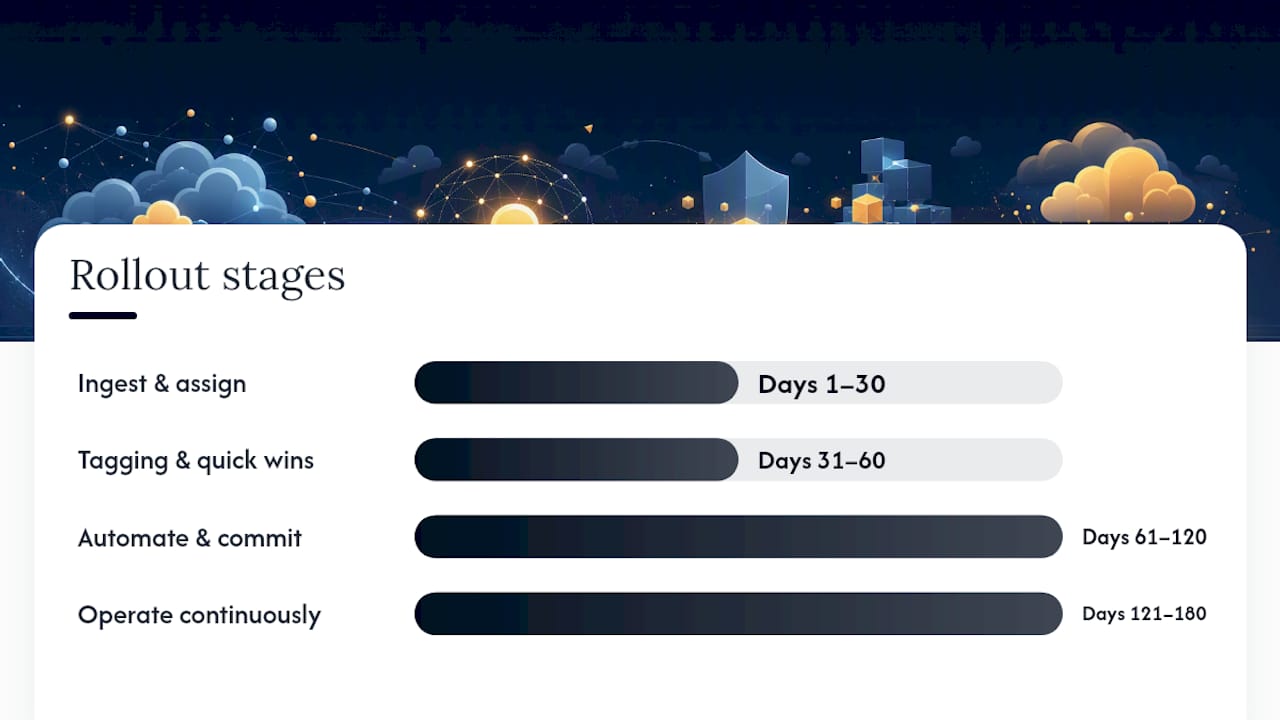
What does a realistic 90-to-180-day rollout look like?
Trying to fix everything in month one guarantees you fix nothing well. A staged rollout with clear gates works better:
- Days 1 to 30: ingest and assign. Connect billing exports from every provider, get AWS CUR flowing, and assign a named owner to every major cost center, even if the tagging underneath it is still messy.
- Days 31 to 60: fix tagging and run quick wins. Clean up the top untagged cost categories, schedule nonproduction environments, and clear orphaned storage. These are low-risk, high-visibility wins that build trust with finance fast.
- Days 61 to 120: automate and commit. Roll out policy-as-code guardrails, automate rightsizing recommendations into a review queue, and begin purchasing commitments against forecasted steady-state usage.
- Days 121 to 180: operate continuously. Move to weekly anomaly reviews, quarterly commitment rebalancing, and a standing governance board that approves new spend patterns before they scale.
Track these success gates along the way: percentage of spend allocated to a named owner, percentage of identified waste actually reclaimed, and forecast accuracy versus actuals. Prioritize actions by expected savings divided by implementation risk, not just by raw dollar size. A $200,000 fix that requires a production migration should usually wait behind a $50,000 fix you can ship this week.
Pro Tip: Show finance a reclaimed-waste number every 30 days, even a small one. Momentum, not perfection, is what keeps budget for the FinOps program itself.
What should you expect from a professional cloud cost audit?
Not every team has the bandwidth to run this roadmap internally, so a professional audit that pairs AI-driven analytics with hands-on engineering review across multiple cloud environments can help identify idle resources, oversized instances, and security gaps that usually accompany cost sprawl.
The engagement runs on a pay-on-savings model where fees are based on actual savings realized, so if nothing gets saved, nothing gets billed, aligning the incentive with your outcome instead of hours worked.
How do AWS, Azure, and GCP pricing models actually compare?
Comparing cloud pricing models means comparing risk-transfer instruments, not just numbers on a rate card. AWS structures discounts primarily through Savings Plans (flexible, compute-focused commitments) and Reserved Instances (specific to instance family and region). Azure runs a similar Reserved VM Instance model plus Azure Hybrid Benefit for organizations bringing existing Windows Server or SQL Server licenses. GCP takes a different default approach: sustained-use discounts apply automatically without any commitment, and Committed Use Discounts stack on top for further savings.
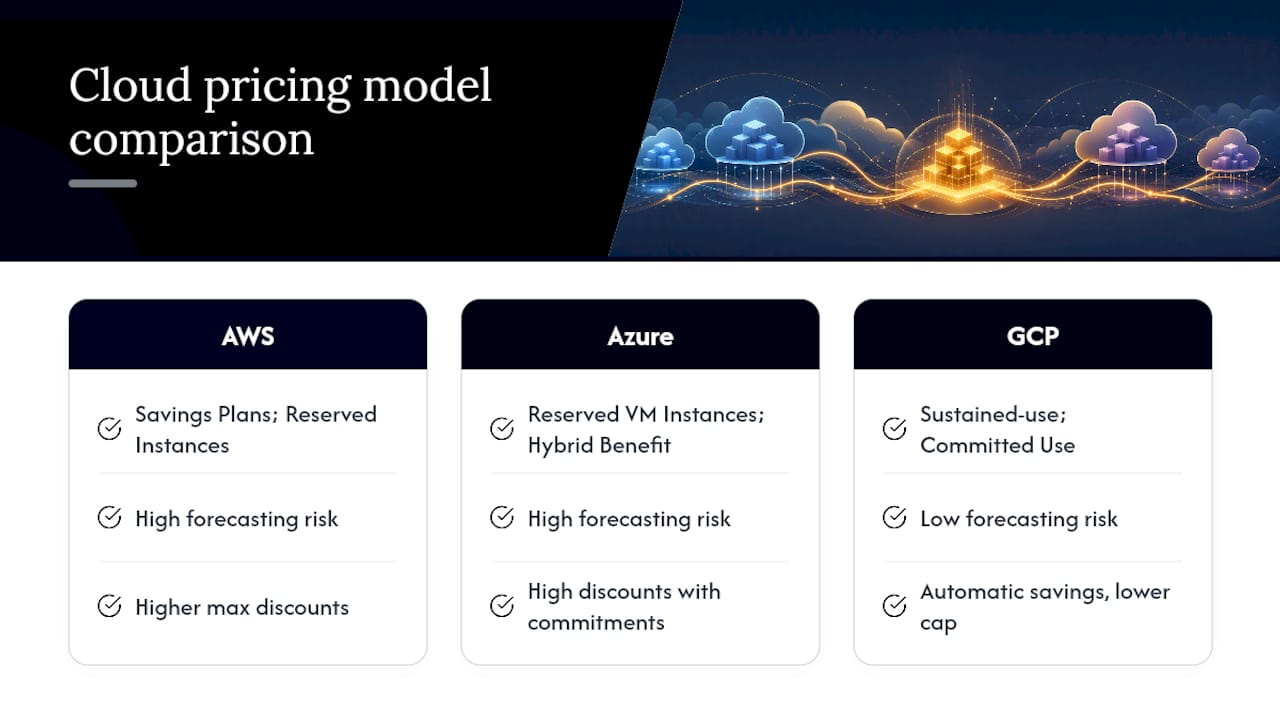
That structural difference matters for how you budget. AWS and Azure both reward you for locking in usage ahead of time, which means forecasting accuracy is the deciding factor in whether commitments pay off. GCP’s automatic discounts reduce that forecasting risk but usually cap out at a lower discount rate than a well-planned AWS Savings Plan.
Provider documentation from IBM’s overview of cloud cost optimization confirms that native recommenders, tools built into each console that flag rightsizing and commitment opportunities, are foundational starting points regardless of provider. But none of them show you the other two clouds. That’s the core limitation of native tooling in a multi-cloud estate: each recommender optimizes its own island.
If AWS carries the bulk of your workload, as it does for most multi-cloud estates, mastering its Savings Plans and CUR data first gives the highest return before you replicate the same discipline on Azure or GCP.
Are third-party multi-cloud cost tools worth adding?
Third-party tools exist to solve exactly the problem native recommenders can’t: a single normalized view across every provider you use. When evaluating one, judge it against four criteria rather than a feature checklist. Can it ingest billing data from every cloud you actually run, including Kubernetes cost allocation? Does it support virtual tagging for the shared costs that never get tagged at the resource level? Can it surface anomaly detection with configurable thresholds, not just a fixed percentage spike alert? And does it integrate with your existing data warehouse or BI stack instead of forcing you into a closed dashboard?
Entry-level field tools tend to cover basic dashboarding and alerting well but fall short on deep Kubernetes namespace allocation. Enterprise platforms usually handle namespace-level and commitment-automation depth but come with a steeper implementation lift and a longer time to value. Weigh that trade-off against your team’s actual bandwidth, not just the feature list on a sales page.
Whatever tool you choose, treat it as a visibility layer, not a savings guarantee. The FinOps Foundation’s Focus framework exists specifically to standardize how these tools measure and report cost, so a tool built against that standard will be easier to compare against alternatives later. Visibility identifies the opportunity; someone still has to execute the rightsizing, cancel the orphaned resource, or buy the commitment.
Why does data transfer and network egress cost so much across clouds?
Egress is the line item that surprises finance teams the most, because it scales with architecture decisions made months earlier, not with any single resource choice. Moving data out of a cloud provider, whether to the internet, to another cloud, or even between regions within the same provider, typically carries a per-gigabyte charge that compounds fast at scale.
Multi-cloud architectures make this worse by design. Every time a workload on AWS calls a service on Azure, or a backup job replicates data from GCP to AWS for redundancy, you’re paying egress on both the sending and often the receiving side. Teams that build cross-cloud data pipelines without mapping the egress cost upfront frequently discover the transfer fees exceed the compute cost of the workload itself.
The fix isn’t avoiding multi-cloud, it’s architecting around egress deliberately. Keep data processing colocated with data storage wherever possible. Batch cross-cloud transfers instead of running them continuously. Cache frequently accessed data at the edge or in the consuming cloud rather than repeatedly pulling it across a boundary. And when your normalized billing dataset comes together, break out data transfer as its own line item rather than burying it inside general networking costs, since it’s usually the fastest-growing category as workloads scale.
How do you reconcile currency and billing differences between providers?
Multi-cloud billing gets genuinely messy once you’re operating across regions with different invoicing currencies. AWS, Azure, and GCP each let you set a billing currency at the account or subscription level, but that currency doesn’t always match the currency your finance team reports in, and it rarely matches across all three providers if your organization operates internationally.
The practical fix is picking one reporting currency for your normalized dataset, converting every provider’s invoice into it using a consistent exchange rate source, and documenting that conversion methodology so finance can audit it later. Don’t let each provider’s native currency flow untouched into your consolidated dashboard. A $10,000 discrepancy that looks like overspend might just be an unconverted invoice sitting in a different currency than the rest of your report.
Billing cycles add a second layer of friction. AWS closes invoices at the end of the calendar month; other providers may close on a different cycle or apply credits with a lag. When you’re reconciling actuals against forecast, build in a buffer for late-posting credits and discounts rather than treating day-one invoice totals as final. Support fees and marketplace charges especially tend to post separately from core usage, and reconciling them manually every month is a common source of finance and engineering disagreeing about whether a “savings win” actually happened.
How do you keep tagging consistent across every cloud you use?
Tagging is the single biggest point of failure in multi-cloud cost allocation, and it’s almost always a process problem, not a tooling problem. The fix starts with a shared tag taxonomy defined once, at the organization level, before any team starts tagging independently.
A workable taxonomy needs at minimum: owner (the team or individual responsible), environment (production, staging, dev), cost-center (the budget line it maps to), and product (the service or feature it supports). Keep the list short. A 20-field tagging policy nobody follows is worse than a four-field one everyone actually applies.
Enforce it at resource creation, not after the fact. AWS, Azure, and GCP all support policy-as-code tools that can block resource creation when required tags are missing, and that gate is far cheaper than a retroactive tagging cleanup across thousands of resources. Oracle’s guidance on cloud cost governance treats tagging enforcement as a foundational control precisely because untagged spend is nearly impossible to allocate accurately after the fact.
For the spend that will never carry a native tag, shared load balancers, central logging, cross-team networking, use virtual tags: rules applied in your normalized dataset that allocate that cost proportionally based on usage or headcount, rather than leaving it in an “unallocated” bucket that erodes trust in your reporting every month.
An engineer’s take on what actually moves the needle
Most FinOps advice focuses on dashboards. Dashboards don’t save money, actions do. If I had to pick the three automations worth deploying first, they’d be scheduled shutdowns for nonproduction environments, policy-as-code blocks on untagged resource creation, and automated rightsizing recommendations routed into a weekly review queue with a named approver.
The mistakes I see most often aren’t technical, they’re organizational. Teams over-commit to Reserved Instances based on a forecast that was already stale by the time the purchase cleared. Shared costs, like a central logging pipeline or a shared VPC, sit in an “unallocated” bucket for months because nobody wants to own the allocation fight. And automation gets deployed without guardrails, so a scheduling script that shuts down a dev environment on Friday night also catches a demo environment someone needed for a Monday morning client call.
None of this requires exotic tooling. It requires someone willing to own the unglamorous work of tagging discipline and weekly review, before you invest in anything more sophisticated. Validating that cost changes preserve performance matters just as much as the savings number itself, since a rightsizing win that causes a latency regression isn’t a win.
— Aaditya Parashar
How Cost Beacon turns this roadmap into realized savings
Running the full FinOps lifecycle internally takes time most IT and finance teams don’t have to spare. Cost Beacon is built for exactly that gap: a pay-on-savings review that pairs AI-driven analytics with hands-on engineering across AWS, Azure, GCP, and Kubernetes, without a retainer or upfront fee attached.
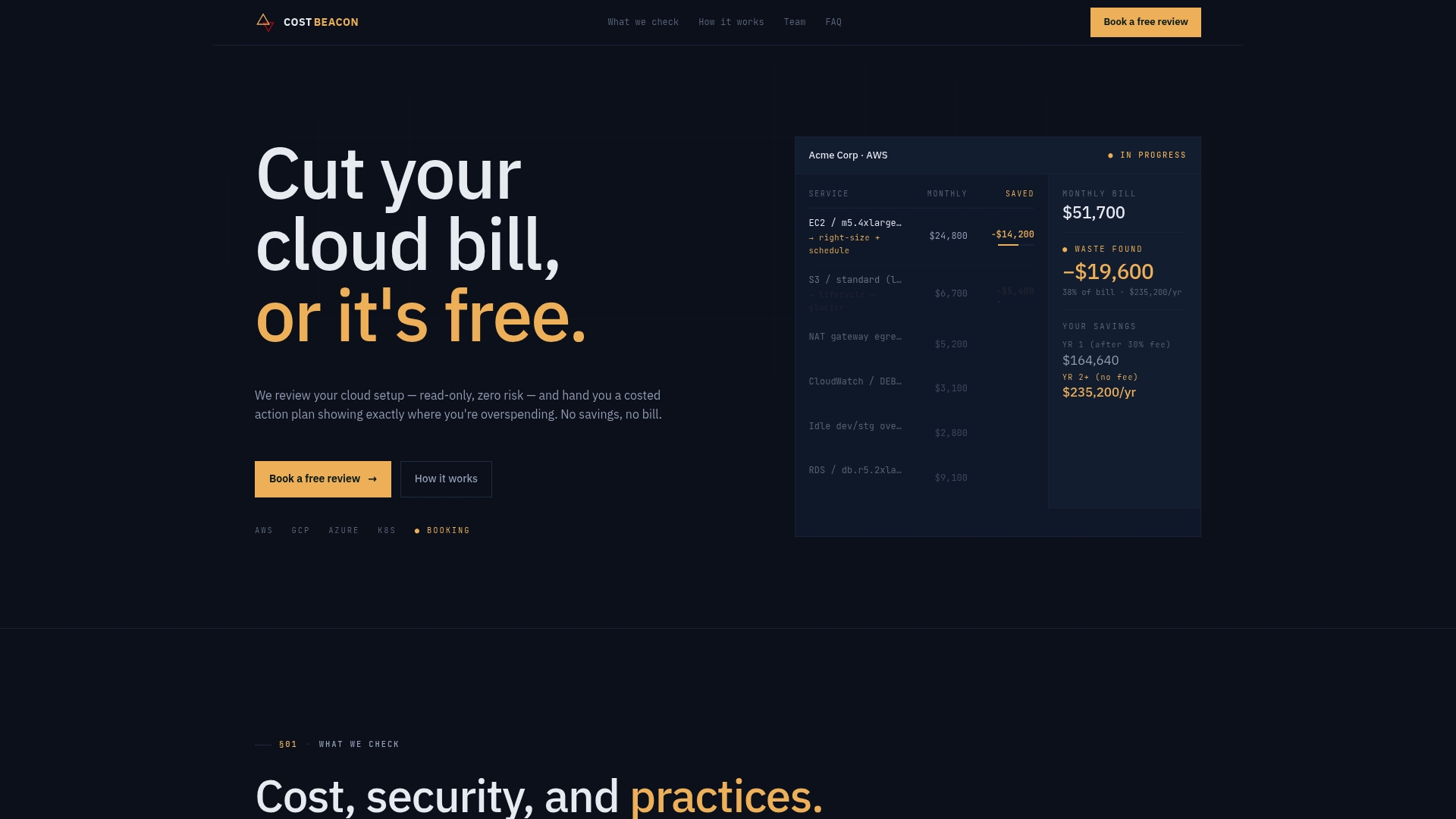
The audit produces a prioritized action plan with an expected savings figure per item, the same structure this article walked through, tagging fixes, rightsizing candidates, commitment opportunities, and security gaps that tend to ride along with cost sprawl. No savings, no invoice.
Teams that benefit most are the ones with real multi-cloud complexity but not enough internal FinOps capacity to run the 90 to 180 day rollout on their own. Before a review, pull your last three months of billing data and a rough list of who owns which accounts. From there, start a cost and security review with Cost Beacon and get a prioritized plan back with real dollar estimates attached.
Sources
The FinOps Foundation’s Focus framework sets the standard vocabulary and maturity model this article leans on throughout. Microsoft’s cloud cost optimization principles and IBM’s overview of cost optimization both cover native tooling in more depth. Gartner’s spending forecast is worth bookmarking for budget conversations with leadership. Check your own AWS, Azure, and GCP recommenders monthly, they update faster than any guide can.
Aaditya works on cloud cost and platform engineering at Cost Beacon, mostly on AWS and Kubernetes estates that grew faster than anyone planned for.
 Cost Beacon