Measure before you commit. That is the single highest-leverage move in EC2 cost optimization, and most teams get it backward by buying Savings Plans before they know what they actually use. Fix that order and the rest of the work gets easier.
Three moves produce results within a week. First, kill idle resources: unattached EBS volumes, orphaned elastic IPs, and instances nobody stopped after a project ended. Second, run the rightsizing candidates AWS Compute Optimizer already generated for your account. Third, cover whatever steady-state baseline remains with a Savings Plan.
- Rightsizing typically saves up to a quarter on affected instances
- Migrating to Graviton (arm64) often saves a significant percentage on price-performance
- Spot Instances can cut costs greatly for interruption-tolerant workloads
Pro Tip: Run these three steps in that exact order. Buying commitments before rightsizing locks in the waste you were trying to remove.
Key Takeaways
EC2 cost optimization works best when teams measure usage first, rightsize before buying commitments, and sequence changes from low-risk quick wins to larger architectural moves.
| Point | Details |
|---|---|
| Measure before committing | Collect CPU, memory, network, and EBS data for two to four weeks before buying Savings Plans or RIs. |
| Rightsize with Compute Optimizer | Cross-check CPU-only recommendations against guest memory data to avoid bad resize decisions. |
| Sequence by risk, not size | Capture low-risk wins like idle resource cleanup and gp2-to-gp3 migration before tackling architecture. |
| Layer commitment models | Cover measured baseline with Savings Plans, then add Spot for interruption-tolerant workloads. |
| Get a risk-free audit | Cost Beacon’s pay-on-savings review has produced an average bill reduction across client industries. |
Table of Contents
- Optimizing storage costs tied to EC2 instances
- Reducing EC2 networking and data transfer charges
- Cutting software licensing and add-on service costs
- Can the Reserved Instance Marketplace lower your costs?
- Do instance hibernation and scheduling actually save money?
- How do you test and migrate to modern instance families like Graviton?
- Which EC2 pricing model should you commit to first?
- Why rightsizing has to come before any commitment purchase
- Which AWS tools actually surface EC2 savings opportunities?
- A phased rollout that funds itself as it goes
- What KPIs keep EC2 savings from eroding after the project ends
- What should you fix in the first 72 hours?
- What a pay-on-savings audit actually delivers
- Get a risk-free review of your EC2 spend
- Sources
Optimizing storage costs tied to EC2 instances
EBS spend creeps up quietly because nobody revisits volume types after the initial launch. gp2 volumes still power a surprising share of production fleets years after gp3 became the better default, and that gap costs money every month.
gp3 decouples IOPS and throughput from volume size, so you stop overpaying for capacity you provisioned just to get performance. A 500GB gp2 volume you sized for throughput can often move to a smaller gp3 volume with explicitly provisioned IOPS at a lower total price. AWS’s own phased cost reduction case study called out gp2 to gp3 migration as one of the highest-impact, lowest-downtime changes available, and it runs online with no instance stop required.
Snapshots are the second leak. Automated backup jobs pile up incremental snapshots long after the retention policy anyone remembers expires. Run a quarterly audit against your snapshot inventory and enforce lifecycle policies through Data Lifecycle Manager instead of relying on someone to remember to delete them.
A few habits worth building into your standard operating procedure:
- Audit EBS volume types quarterly and flag any
gp2volumes still in production. - Delete snapshots outside your retention window using automated Data Lifecycle Manager rules.
- Right-size provisioned IOPS volumes; most workloads over-provision throughput they never touch.
- Move cold snapshots to lower-cost archive tiers when infrequent access is acceptable.
Reducing EC2 networking and data transfer charges
Data transfer charges are the line item most engineers underestimate until the bill arrives. Cross-availability-zone traffic, NAT gateway processing fees, and public internet egress from EC2 to end users all stack up independently of compute spend, and none of them show up in a simple per-instance cost view.

VPC endpoints solve a specific, common version of this problem. Traffic from EC2 to services like S3 or DynamoDB that routes through a NAT gateway gets charged both a NAT processing fee and a data transfer fee. Route that same traffic through a gateway or interface VPC endpoint instead, and you eliminate the NAT gateway hop entirely for that traffic, cutting both charges at once.
Cross-AZ traffic is trickier because it’s often invisible until you query the Cost and Usage Report by usage type. Chatty microservices calling across availability zones for every request rack up per-gigabyte charges that a single-AZ or same-subnet design would avoid. If your architecture tolerates it, keep latency-sensitive service-to-service calls within one AZ.
Practical steps that move the needle fast:
- Add VPC endpoints for S3, DynamoDB, and other frequently accessed AWS services.
- Query your CUR by usage type to find hidden cross-AZ and NAT gateway charges.
- Consolidate NAT gateways per AZ rather than per subnet where architecture allows it.
- Use CloudFront or S3 transfer acceleration instead of routing large downloads directly off EC2.
Cutting software licensing and add-on service costs
Licensing costs riding on top of EC2 compute charges often exceed the instance price itself, and almost nobody audits them the way they audit compute. Windows Server, SQL Server, and third-party enterprise software licensed by the core or by the instance can double or triple your effective hourly rate for a given workload.
Bring-your-own-license (BYOL) models make sense when you already hold enterprise agreements, but they require dedicated hosts or dedicated instances in many cases, and that constraint itself carries a cost. Compare BYOL against AWS-provided license-included AMIs before assuming BYOL is cheaper. For smaller fleets, license-included pricing frequently wins once you account for the dedicated capacity BYOL requires.
Third-party monitoring agents, security tools, and backup software billed per-instance or per-vCPU are the other hidden cost center. A per-instance licensing model that made sense at 50 instances becomes a real budget line at 500, especially after autoscaling multiplies your effective agent count during traffic spikes.
Review license allocation the same way you review compute: quarterly, against actual instance count, not against the count from your last true-up cycle. Consolidating workloads onto fewer, larger instances (where rightsizing data supports it) reduces per-instance license fees as a side effect, on top of any compute savings.
Can the Reserved Instance Marketplace lower your costs?
Yes, when you have Standard RIs you no longer need. The Reserved Instance Marketplace lets you sell unused Standard Reserved Instances back for a partial recovery of your upfront cost, and lets buyers pick up capacity at a discount versus buying new.
This matters most for teams that over-committed to a specific instance type or Region before a re-architecture, then found themselves stuck holding a three-year commitment for infrastructure that no longer matches their footprint. Rather than let that RI run to term unused, listing it on the Marketplace recovers value that would otherwise sit dead on the balance sheet.
A few limits worth knowing before you rely on this as a strategy:
- Only Standard RIs are eligible for resale; Convertible RIs cannot be listed.
- You need an active bank account on file with AWS to receive marketplace proceeds.
- Marketplace liquidity varies by instance type and Region, so pricing and sale speed aren’t guaranteed.
- Selling recovers partial value; it isn’t a substitute for accurate initial commitment sizing.
The better play is treating the Marketplace as an escape valve, not a planning tool. Get your rightsizing and commitment sizing right up front, and you’ll rarely need it.
Do instance hibernation and scheduling actually save money?
Yes, and they’re the most underused lever on this list. Any instance running 24/7 that only needs to be available during business hours or specific batch windows is burning money the other 60% to 75% of the time.
Instance Scheduler on AWS is a free, deployable solution that stops and starts EC2 instances (and RDS instances) on a schedule you define per tag or per instance group. Development, staging, QA, and internal tooling environments are the obvious candidates. Stop those instances nights and weekends, and you cut their compute cost by roughly two-thirds without touching a line of application code.
Hibernation goes a step further than a simple stop for workloads with slow, expensive boot processes. Hibernating an instance saves its RAM contents to the root EBS volume, so when you resume it, the operating system and application state come back exactly where they left off, no cold cache, no cold start. That matters for workloads with large in-memory caches or lengthy application initialization, where a full stop and start would cost you the ramp-up time every single day.
Both approaches require identifying non-production and intermittent workloads first, which is exactly the kind of gap a Cost Optimization Hub review or an outside audit tends to surface faster than manual tagging efforts ever do.
How do you test and migrate to modern instance families like Graviton?
Picking the right instance family starts with data, not a spec sheet comparison. Before you touch a launch template, collect four signals over a representative window.
- CPU utilization across peak and off-peak periods, not just averages.
- Guest memory usage, since CloudWatch doesn’t capture this by default and most bad rightsizing decisions come from ignoring it.
- Network throughput, especially for anything approaching instance-level bandwidth limits.
- EBS throughput and IOPS consumption relative to what the attached volume actually provisions.
A two-to-four week lookback captures weekly cycles for most workloads; batch or seasonal jobs need longer — see these API performance optimization techniques that can reduce compute consumption effectively. Compute Optimizer’s enhanced infrastructure metrics option extends analysis to 93 days when you need that longer view for accurate recommendations.
Testing Graviton (arm64) safely follows a specific pattern: build multi-architecture container images or binaries first, deploy to a small percentage of production traffic behind your load balancer, and set explicit rollback criteria (latency regression, error rate threshold) before you expand the rollout. Most application-layer workloads on Linux, including common web frameworks and interpreted languages, port to arm64 with minimal code changes. Anything relying on architecture-specific compiled dependencies needs a closer look first.
Pro Tip: Don’t roll out Graviton fleet-wide on day one, even after a clean A/B test. Interruption patterns and CPU steal behavior can differ subtly under real production load in ways a short pilot won’t reveal.
Two yeses out of three usually justifies a migration test.
Which EC2 pricing model should you commit to first?
Sequence matters more than which model you pick. Buy commitment coverage in the wrong order and you’ll be locked into capacity that no longer matches your rightsized footprint.
- On-Demand: no commitment, full price, best for unpredictable or short-lived workloads you haven’t measured yet.
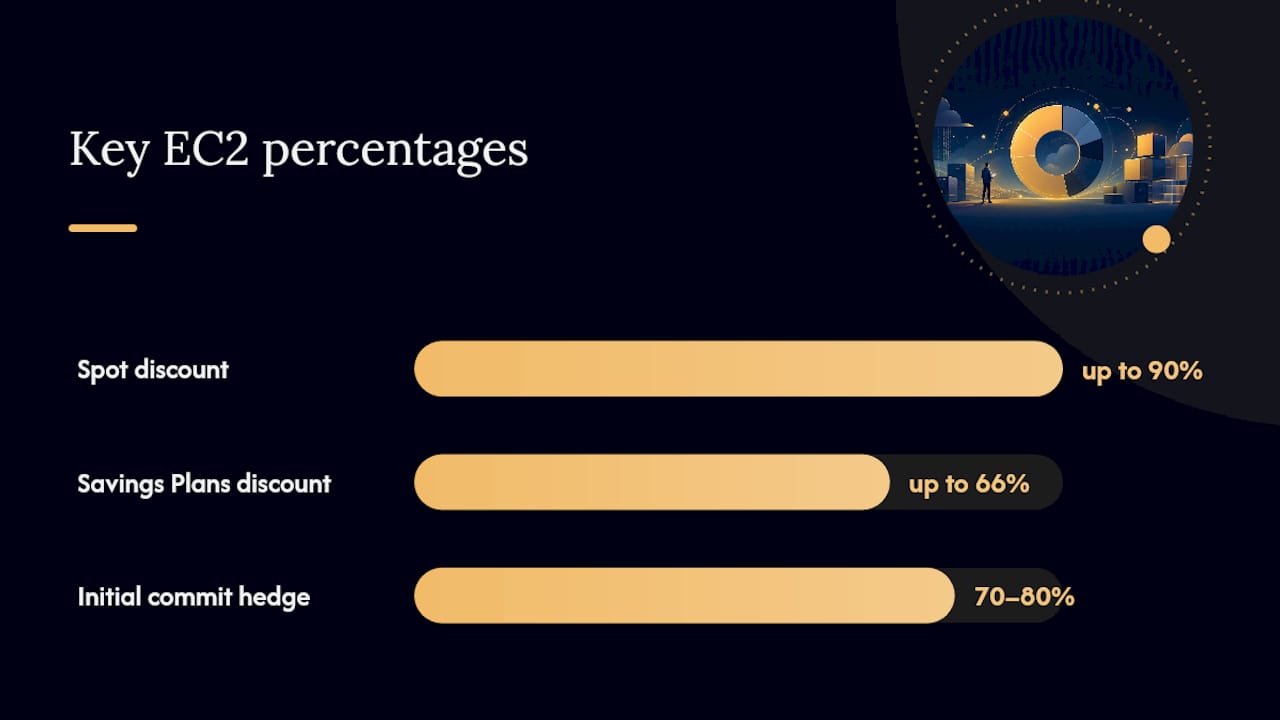
- Compute Savings Plans: flexible discounts of up to 66% off On-Demand rates, applied automatically regardless of instance family, size, or Region, making them the practical default for most steady baseline usage.
- Reserved Instances: similar or deeper discounts than Savings Plans, but tied to a specific instance type or Region unless you buy Convertible RIs, which limits flexibility during migrations.
- Spot Instances: discounts up to 90% off On-Demand, ideal for stateless, fault-tolerant, or batch workloads that can handle a two-minute interruption notice.
The sequence that avoids overcommitment: measure your steady-state baseline over several weeks, rightsize it, then buy Savings Plans coverage for that measured baseline, not your peak. Layer Spot on top for anything interruptible, and leave genuinely unpredictable or short-term workloads on On-Demand rather than forcing them into a commitment.
Compute Savings Plans tend to outperform Reserved Instances as a first purchase for teams still actively rightsizing or migrating instance families, since the discount follows the workload instead of locking you to a specific configuration. Hedge by committing to only 70% to 80% of your measured baseline at first, then layer additional coverage in as your usage pattern stabilizes. Overcommitting early is the most common and hardest to reverse mistake in this entire process.
Why rightsizing has to come before any commitment purchase
Committing capital to Savings Plans or Reserved Instances before you rightsize is the single most common way teams lock in waste for a year or three. The fix is a repeatable loop, not a one-time project.
- Pull current recommendations from Compute Optimizer for every instance family in your account.
- Cross-check CPU-only recommendations against guest memory data, since Compute Optimizer can ingest external memory metrics and most bad resize decisions come from relying on CPU alone.
- Validate top candidates with a limited rollout before resizing your entire fleet at once.
- Resize confirmed candidates, then re-run the loop again in 30 to 60 days as usage patterns shift.
Run this loop before every commitment purchase cycle, not just once a year. AWS’s own Savings Plans guidance is explicit that committing before rightsizing usually locks in the exact waste you’re trying to eliminate.
Autoscaling strategy affects how much rightsizing actually saves. Standard Auto Scaling Groups work fine when your workload’s instance shape is stable and you’re mainly scaling instance count up and down with demand. Karpenter, by contrast, makes provisioning decisions at the pod level in Kubernetes clusters, selecting the most cost-effective instance type and size for each workload’s actual resource request rather than forcing everything into a pre-defined launch template. For clusters running mixed workload shapes, Karpenter’s bin-packing tends to beat ASG-based node groups on both cost and utilization, because it isn’t locked into a single instance type per group.
Pro Tip: Feed guest memory metrics into Compute Optimizer through the CloudWatch agent before you trust any memory-bound workload’s rightsizing recommendation. CPU-only data alone will tell you a memory-constrained instance looks perfectly sized when it isn’t.
Continuous rightsizing paired with the right autoscaler is also the operating pattern FinOps practitioner guidance points to as the difference between a one-time savings event and a durable cost posture.
Which AWS tools actually surface EC2 savings opportunities?
Each AWS cost tool answers a different question, and confusing their jobs wastes time. Here’s the practical mapping.
| Tool | Best for |
|---|---|
| AWS Compute Optimizer | Instance-level rightsizing and Graviton migration recommendations |
| Cost Explorer | Trend analysis and forecasting spend by service or tag |
| Cost and Usage Reports (CUR) | Granular, queryable line-item data for custom cost analysis |
| Cost Optimization Hub | Cross-account, prioritized savings recommendations in one view |
| Instance Scheduler | Automated start/stop scheduling for non-production instances |
| Trusted Advisor | Broad account health checks including idle resource flags |
Cost Optimization Hub is worth calling out specifically: it consolidates rightsizing, Graviton migration, and Savings Plans recommendations across every linked account into one prioritized, quantified list, which saves you from stitching together Compute Optimizer output account by account.
Automation is what turns recommendations into savings instead of a backlog nobody actions. Common patterns include:
- EventBridge triggering a Lambda function on Spot interruption notices to handle rebalancing before the two-minute warning expires.
- Instance Scheduler tags driving automated non-production shutdowns outside business hours.
- Infrastructure-as-code guardrails (Terraform or CloudFormation policies) that block launch templates using deprecated instance generations.
Before locking in any estimated savings figure, validate it against a few weeks of actual post-change billing data. Recommendation engines model expected savings; only your CUR shows what you actually captured.
A phased rollout that funds itself as it goes
Sequencing by risk, not by potential savings size, is what makes this work operationally instead of stalling in committee. Three phases, each funding the next.
- Phase 1, weeks 1 to 3: low-risk quick wins. Delete idle resources, migrate
gp2volumes togp3, and consolidate load balancers where duplicate NLBs serve traffic that a shared ALB could handle. These changes carry minimal downtime risk and free up budget immediately. - Phase 2, weeks 4 to 8: modernization. Roll out validated Graviton migrations, resize confirmed rightsizing candidates, and purchase Savings Plans coverage for the now-measured baseline.
- Phase 3, weeks 9 to 12+: architectural consolidation. Address structural issues like per-service load balancers, oversized reserved capacity, and autoscaling group designs that don’t match actual traffic shape.
One documented phased engagement using exactly this sequence delivered a substantial cost reduction in a few months, with NLB-to-ALB consolidation and gp2-to-gp3 migration among the highest-impact individual changes.
Sequencing by risk instead of by dollar size is what lets phase 1 savings pay for the engineering time phase 2 and 3 require. Teams that try to do everything at once usually stall on the riskiest item and capture none of the easy wins waiting behind it.
Cost Beacon builds its engagements around this same phased logic, and its audits have produced significant bill reductions across clients spanning fintech, telecom, and other industries, with fee based only on savings actually realized.
What KPIs keep EC2 savings from eroding after the project ends
Savings decay without ownership. Set these KPIs and someone has to actually watch them.
- Coverage percentage: the share of steady-state compute covered by Savings Plans or RIs versus On-Demand.
- Cost per vCPU-hour: tracks whether rightsizing and instance family upgrades are actually reducing unit cost over time.
- Modern generation adoption: percentage of fleet on current-generation and Graviton instances versus legacy families.
- Spot adoption rate: share of interruption-tolerant workloads actually running on Spot versus On-Demand.
| Control | What it prevents |
|---|---|
| Service control policies (SCPs) | Launches of deprecated or non-approved instance types |
| IaC defaults for instance type | Manual launches bypassing rightsizing recommendations |
| Tag enforcement policies | Untracked resources that evade cost attribution |
| Automated CUR query alerts | Cost anomalies going unnoticed between review cycles |
Assign clear review ownership, whether that’s a FinOps function or a rotating engineering lead, and build savings review into your normal sprint cadence rather than a quarterly fire drill. The Well-Architected cost optimization pillar lays out the benchmark targets worth measuring against.
What should you fix in the first 72 hours?
Start here before anything else, because these changes carry essentially zero risk and produce a visible bill reduction within days.
- Release unattached elastic IPs; AWS bills for these once they’re not attached to a running instance.
- Delete unattached EBS volumes and snapshots outside your retention window.
- Stop instances that have sat idle with near-zero CPU and network activity for two or more weeks.
- Apply Instance Scheduler tags to non-production environments for automatic nights-and-weekends shutdown.
- Query Cost Explorer and your CUR by resource ID a week later to confirm the drop actually happened.
- Add IaC guardrails or tag policies so idle resources can’t quietly reaccumulate next quarter.
What a pay-on-savings audit actually delivers
Cost Beacon runs EC2 cost optimization the same way this article lays it out: measure first, rightsize before committing, sequence changes by risk. The difference is combining AI-driven analysis of your usage patterns with hands-on engineering review to catch the idle resources and oversized instances a dashboard alone tends to miss.
You pay only when savings are realized, which means the incentive is aligned with your actual bill, not with billable hours. Teams that benefit most are the ones with sprawling, multi-account AWS footprints where nobody has time to run the rightsizing loop manually every month.
Get a risk-free review of your EC2 spend
Everything above works if someone owns it: pulling Compute Optimizer data monthly, validating Graviton candidates, resequencing Savings Plans coverage as your baseline shifts. Cost Beacon exists for the teams that don’t have the bandwidth to run that loop themselves. We combine AI-driven usage analysis with hands-on engineering review to find idle resources, oversized instances, and pricing missteps that a quarterly dashboard glance usually misses, then hand you a prioritized action plan with expected savings per item.
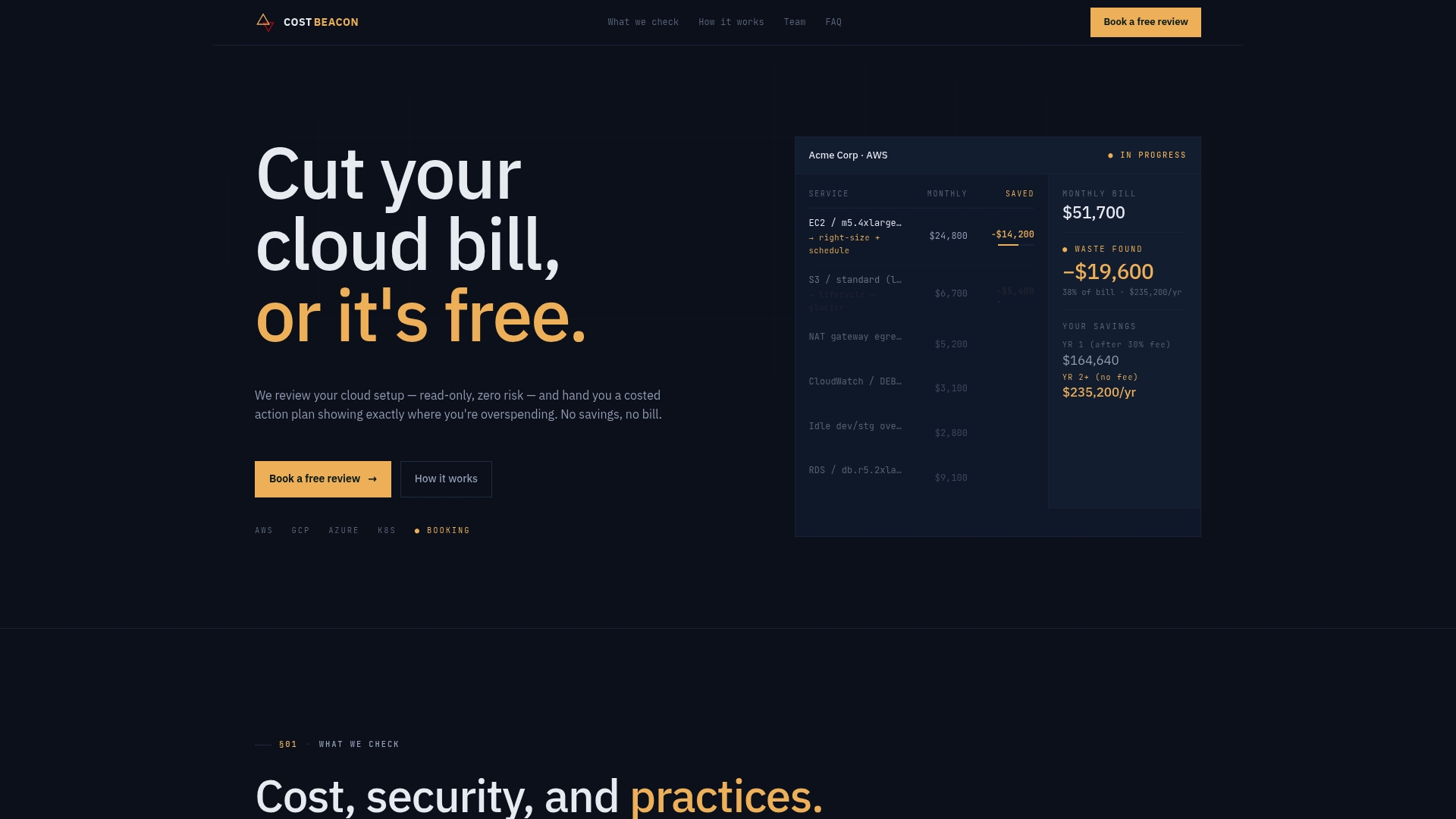
You pay a fee based only on savings actually realized, no upfront cost and no fee if we don’t find anything worth acting on. If your EC2 footprint has grown past the point where manual rightsizing keeps up, book a cloud cost review with Cost Beacon and see what a prioritized action plan looks like for your account.
Sources
Recommended
Aaditya works on cloud cost and platform engineering at Cost Beacon, mostly on AWS and Kubernetes estates that grew faster than anyone planned for.
 Cost Beacon