Start with rightsizing and auto-deallocate scheduling, then layer on commitments. That single sequence drives most of the savings we see teams leave on the table. Rightsizing and scheduling cut billable hours immediately by removing waste that shouldn’t exist in the first place. Once usage is honest, a mix of Reservations, Savings Plans, and Spot VMs compounds the savings on top of a leaner baseline.
Here’s why the order matters: buying commitments before rightsizing locks you into paying for oversized capacity for a long term. Fix the size first, then commit.
Assign these next steps this week:
- Pull Azure Advisor’s cost recommendations and sort by estimated yearly savings.
- Flag any VM with under 5% average CPU utilization over 72 hours for review.
- Turn on auto-shutdown for every dev/test VM by Friday.
- Model your top three VM families in the Azure Pricing Calculator before buying anything.
Microsoft’s own data on Azure Reserved Virtual Machine Instances cites savings up to roughly 72% for certain terms and sizes, and Azure Hybrid Benefit stacks on top of that for eligible Windows and SQL licenses.
Key Takeaways
Azure VM cost optimization works best as a sequence: rightsize and schedule first to eliminate waste, then layer Reservations, Savings Plans, and Spot VMs on top of an accurate baseline.
| Point | Details |
|---|---|
| Rightsize before committing | Validate Advisor’s resize suggestions with usage data before buying any Reservation. |
| Schedule non-prod shutdowns | Auto-deallocate dev/test VMs nightly and on weekends to cut idle compute charges. |
| Layer discount types | Mix Reservations for stable workloads, Savings Plans for dynamic fleets, and Spot VMs for interruptible jobs. |
| Govern to prevent drift | Use Azure Policy, tagging, and quarterly commitment reviews so savings don’t erode after month one. |
| Get outside help when capacity is thin | Costbeacon’s pay-on-savings audit finds rightsizing and commitment gaps internal teams often miss, delivering substantial bill reductions across client engagements. |
Table of Contents
- Azure VM Cost Optimization Levers Ranked by Effort vs. Impact
- How Azure Bills VMs and What Drives Each Meter
- How Do You Rightsize Azure VMs Safely?
- Reservations, Savings Plans, and Azure Hybrid Benefit Compared
- What’s the Right Mix of Discounts for a Steady Fleet?
- Governance Controls That Keep Azure VM Savings From Sliding Back
- A 90-Day Rollout Plan for Azure VM Cost Optimization
- When to Bring in Outside Help for Azure VM Cost Optimization
- Frequently Asked Questions
- Sources
Azure VM Cost Optimization Levers Ranked by Effort vs. Impact
Not every lever deserves equal attention in week one. Some deliver savings within hours; others need weeks of validation before you touch production.
- Rightsizing (low effort, high impact): Azure Advisor flags oversized VMs using CPU, memory, and network thresholds. Most teams find 15% to 30% of their fleet is oversized on the first pass.
- Scheduled shutdown (low effort, high impact): Non-prod VMs running nights and weekends waste money for no reason. Auto-deallocate schedules routinely cut dev/test compute costs substantially.
- Azure Spot VMs (medium effort, high impact, higher risk): Interruptible workloads like batch jobs and CI/CD runners can see substantial discounts off pay-as-you-go rates, but eviction notices arrive with little warning.
- Reservations and Savings Plans (low effort once sized correctly, high impact): Locks in discounts on steady-state compute, but only pays off after rightsizing.
- Azure Hybrid Benefit (low effort, high impact for licensed workloads): Applies existing Windows Server, SQL Server, RHEL, or SLES licenses toward Azure compute costs.
- Managed disk tiering (medium effort, moderate impact): Downgrading Premium SSD to Standard SSD on non-critical volumes often goes unnoticed by users.
Pro Tip: Check for orphaned disks after you deallocate a VM. Deallocation stops compute charges, but attached managed disks keep billing until you delete them.
The most common trap is overcommitting to Reservations before rightsizing is done, which locks in the wrong VM size for a year or three.
How Azure Bills VMs and What Drives Each Meter
Your invoice isn’t just compute hours. Azure bills VMs across several independent meters, and understanding each one changes how you prioritize fixes.
- Compute hours: Billed per vCPU/RAM combination, charged only while the VM is in a “Running” state.
- Managed disks: Billed per GB per month regardless of whether the VM attached to them is running.
- Public IP addresses: Billed hourly whether or not traffic is flowing.
- Bandwidth: Outbound data transfer is metered; inbound is typically free.
- Load balancers: Billed by rule count and data processed.
- Azure Monitor: Log ingestion and retention add up fast on verbose diagnostic settings.
The distinction between VM states matters more than most teams realize. A VM stopped from inside the guest operating system keeps billing for compute. Only the “Stopped (Deallocated)” state in the Azure portal releases the host and stops compute charges, though disks and reserved IPs continue billing until deleted.
VM size, OS choice, disk tier, and region all shift your retail rate and determine which commitments even apply. Microsoft’s own guidance on planning VM costs recommends modeling these variables before deployment.
Pro Tip: Before buying any Reservation or Savings Plan, cross-check the exact meter breakdown in Cost Management against what you modeled in the Pricing Calculator. The two should match within a few percent, or your commitment sizing is off.
How Do You Rightsize Azure VMs Safely?
Rightsizing goes wrong when teams act on Advisor’s first suggestion without validating it against real usage patterns. Advisor samples metrics every 30 seconds and applies P95/P99 thresholds against configurable lookback windows, ranging from 7 to 90 days, to flag resize candidates. It weighs user-facing workloads differently than batch or internal tools, but it doesn’t know about your seasonal traffic spikes or that quarterly batch job that runs once every 90 days.
Follow this validation sequence before resizing anything in production:
- Pull the Advisor recommendation and note the suggested SKU alongside the current one.
- Check P95/P99 CPU and memory over at least a 30-day window, not just the default snapshot.
- Review application dependencies for memory-bound processes that don’t show up in CPU metrics.
- Schedule a maintenance window and resize one canary instance first.
- Monitor for 48 to 72 hours before rolling the change out fleet-wide.
For workloads with unpredictable spikes, autoscale beats a fixed resize. For genuinely idle non-prod VMs, scheduled auto-deallocate beats either option.
Pro Tip: Pair every auto-shutdown schedule with an automated start schedule. Teams that skip this end up manually restarting VMs every Monday, which defeats the purpose of automating it.

Reservations, Savings Plans, and Azure Hybrid Benefit Compared
Three commitment options exist for steady-state compute, and picking the wrong one is an expensive mistake to unwind.
| Option | Savings potential | Flexibility / term | Eligibility / constraints | Operational risk | Best use case |
|---|---|---|---|---|---|
| Reservations (RIs) | Up to ~72% vs. pay-as-you-go for eligible sizes and terms | 1yr or 3yr; scoped to a VM family and region | Instance size flexibility within a family group | Unused commitment if usage drops or fleet shrinks | Stable, predictable workloads with known size |
| Savings Plans for Compute | Deep but generally less than RIs | 1yr or 3yr; hourly spend commitment across families/regions | Applies automatically to most expensive eligible compute first | Lower risk of stranding, but less discount depth | Dynamic fleets that shift VM families or regions |
| Azure Hybrid Benefit | License cost offset, stacks with RIs/Savings Plans | No term commitment; tied to license ownership | Requires eligible Windows Server, SQL Server, RHEL, or SLES licenses with Software Assurance | Low, but requires accurate license inventory | Any workload where you already own eligible licenses |
Reservations deliver the deepest discounts but demand accuracy: Reserved Virtual Machine Instances lock you into a family and region for the full term, though instance size flexibility softens the commitment somewhat. Savings Plans trade some of that depth for breadth. Savings Plans for Compute apply discounts automatically to your most expensive eligible compute first, which cuts down on manual allocation work.
Before buying either, model expected ROI with Azure’s pricing calculator using your actual rightsized fleet, not your current oversized one.
- Buy Reservations only after rightsizing, or you’ll commit to the wrong SKU.
- Use shared scope for Reservations if usage moves between subscriptions.
- Check utilization dashboards monthly. Unused commitment is money already spent with no return.
- Don’t double-count Hybrid Benefit savings against a Reservation discount. They stack, but they’re separate line items and finance needs both tracked.
What’s the Right Mix of Discounts for a Steady Fleet?
There’s no universal ratio, but practitioner-level optimization work consistently points toward a layered approach rather than betting everything on one commitment type. Practical optimization guidance supports blending Reservations for predictability, Savings Plans for flexibility, and Spot capacity for interruptible workloads, rather than treating them as competing options.
A reasonable starting framework:
- Predictable, long-running production VMs: Reservations, favoring 3-year terms once you’re confident in the size and family.
- Variable or growing workloads across families/regions: Savings Plans, which auto-apply to your priciest eligible compute.
- Batch jobs, CI/CD agents, stateless workers: Spot VMs, accepting eviction risk in exchange for steep discounts.
Start conservative. A 1-year term costs you less in flexibility risk than a 3-year term if your fleet composition is still shifting.
Pro Tip: *Review commitment utilization every quarter, not just at renewal.
Governance Controls That Keep Azure VM Savings From Sliding Back
Savings without governance decay within a quarter. New VMs get provisioned at default sizes, someone forgets to tag a resource group, and the fleet drifts back toward waste.
Lock in the following controls:
- Azure Policy restricting allowed VM SKUs so nobody spins up an oversized instance by default.
- Mandatory tagging for cost center, environment, and owner on every resource.
- RBAC boundaries so only authorized roles can provision or resize production VMs.
- Cost alerts triggered at defined budget thresholds, not just at month-end.
- The Azure Cost Optimization workbook, which centralizes Advisor recommendations, reservation and savings plan opportunities, and idle-resource queries with Quick Fix actions built in.
Put these workflows on a calendar:
- Run a monthly utilization report against every VM in the fleet.
- Review commitment utilization every quarter and adjust the mix.
- Export Cost Management data to finance for showback reporting.
- Escalate any Advisor recommendation with an estimated yearly saving above your defined threshold to a named owner within five business days.
A 90-Day Rollout Plan for Azure VM Cost Optimization
Assign owners and deadlines, or this plan stalls at the recommendation stage like most Advisor reports do.
Days 0 to 30 (CloudOps owns):
- Inventory and tag every VM.
- Run Advisor and triage recommendations by estimated savings.
- Turn on auto-shutdown for all non-prod VMs.
Days 30 to 60 (CloudOps + App Owners): 4. Pilot rightsizing on the top 20% highest-cost VMs. 5. Validate resize candidates with the P95/P99 checklist.
Days 60 to 90 (FinOps + CloudOps): 6. Model and purchase a conservative first round of Reservations and Savings Plans. 7. Set Azure Policy to block non-approved SKUs going forward.
Track success with a compact set of metrics:
- Percentage of VMs rightsized against Advisor recommendations.
- Commitment utilization rate (target above 90%).
- Monthly dollar savings against baseline.
- Zero performance regressions reported by app owners post-resize.
A practitioner’s note on where these plans stall
Most rollouts don’t fail on technical grounds. They stall because nobody owns the follow-through after the first Advisor report gets triaged, and commitments get bought without a quarterly review cadence attached. Teams that assign a named owner to each phase and actually run the 90-day checklist tend to see meaningful, durable reductions in their Azure bill within one billing cycle.
When to Bring in Outside Help for Azure VM Cost Optimization
Running this playbook internally works well when you have a dedicated CloudOps or FinOps function with time to triage Advisor reports weekly. It gets harder when your VM estate spans hundreds of resources, tagging is inconsistent, or your team is stretched too thin to validate rightsizing candidates before commitments come up for renewal. Unused Reservations sitting idle for months are a common sign that nobody has bandwidth to run the quarterly review this playbook requires.
That’s the gap Costbeacon fills. Costbeacon runs a pay-on-savings cloud cost and security review across AWS, GCP, Azure, and Kubernetes environments, combining AI-driven analytics with hands-on engineering to find the rightsizing candidates, idle resources, and unused commitments your internal team hasn’t had time to chase down. You get a prioritized action plan with expected savings per item, and Costbeacon only invoices a percentage of what you actually realize. No upfront fee, no retainer, no savings means no bill. If your Azure estate has grown past what your team can audit thoroughly, schedule a review with Costbeacon and get a concrete savings estimate before committing to anything.
Frequently Asked Questions
What’s the fastest way to reduce Azure VM costs this month? Run Azure Advisor, act on its highest-savings resize and shutdown recommendations first, then set auto-deallocate schedules on every non-prod VM.
Does stopping a VM stop all charges? No. Stopping a VM from within the operating system keeps it billing for compute. Only the “Stopped (Deallocated)” state in the Azure portal releases the host and stops compute charges, and attached disks keep billing regardless.
Should I buy Reservations or Savings Plans first? Rightsize first, then choose based on fleet stability. Reservations suit predictable workloads on a fixed VM family and region. Savings Plans suit fleets that shift families or regions, since discounts apply automatically to your most expensive eligible compute.
Are Azure Spot VMs safe for production workloads? Only for workloads tolerant of interruption, like batch processing, CI/CD runners, or stateless services with retry logic. Spot VMs can be evicted with short notice, so they aren’t suited to workloads requiring guaranteed uptime.
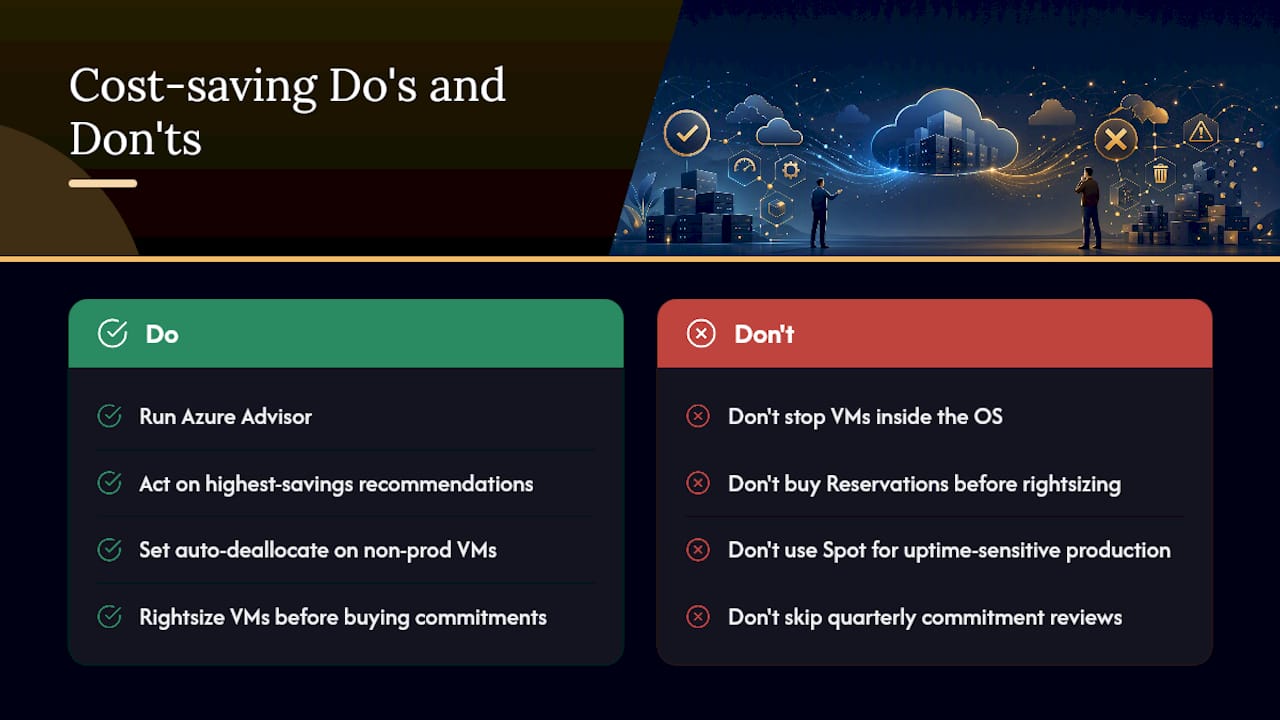
How often should we review our Azure commitment mix? Quarterly at minimum. Review utilization against every Reservation and Savings Plan, and adjust the mix if your fleet composition or workload patterns have shifted since the last purchase.
Sources
Recommended
Aaditya works on cloud cost and platform engineering at Cost Beacon, mostly on AWS and Kubernetes estates that grew faster than anyone planned for.
 Cost Beacon