Cutting AI cloud spend fastest and safest means sequencing three moves in order: get visibility by model and agent, enforce runtime controls, then lock in governance. Skip visibility and you optimize blind. Skip runtime controls and you bleed cash between billing cycles. Skip governance and last quarter’s savings vanish the moment a new agent ships.
Here’s what to do in the next 72 hours:
- Enable model and agent tagging on every inference call, then export that data somewhere queryable.
- Set per-team token budgets or API-gateway caps before the next sprint starts.
- Turn on caching for your top 20% most-repeated queries. That slice usually carries the most waste.
81% of FinOps practitioners now treat AI as a critical productivity tool, according to FinOps’s research on AI for FinOps, and organizations that run structured audits often uncover savings in the range Cost Beacon has documented: meaningful bill reductions across fintech, telecom, and other sectors.
Key Takeaways
AI cloud cost optimization works when visibility by model and agent comes first, runtime controls come second, and governance locks the savings in permanently.
| Point | Details |
|---|---|
| Sequence matters most | Fix visibility, then runtime controls, then governance, in that order, or optimization efforts target the wrong workload. |
| Runtime levers pay fastest | Model routing and semantic caching can cut inference costs substantially with minimal latency impact. |
| Tag everything by agent | Model and agent-level tagging feeds FinOps hubs and prevents finance from misallocating AI spend. |
| Adopt shared standards | MCP and FOCUS automate cost attribution and normalize AI spend alongside traditional cloud spend. |
| Consider a pay-on-savings audit | Cost Beacon delivers a prioritized plan and has driven meaningful bill reductions with no upfront fee. |
Table of Contents
- Why AI cloud costs behave differently than traditional cloud costs
- What runtime levers actually cut inference costs?
- How do you right-size GPU spend on AWS?
- Building the FinOps plumbing that finance will trust
- How to run a two-lever cost experiment that proves savings
- AWS tactical checklist: what to deploy this week
- What an AI cost audit actually delivers
- Cutting storage and I/O costs in AI pipelines
- Connecting AI cost controls to your broader FinOps stack
- Forecasting and budgeting for AI workloads that change month to month
- Why most teams get AI cost optimization backward
- Get a pay-on-savings AI cost review from Cost Beacon
- Sources
Why AI cloud costs behave differently than traditional cloud costs
Traditional cloud bills are mostly predictable: you provision an instance, you pay for the hours it runs. AI workloads break that model. Token billing, model tiers, and retrieval calls stack costs in ways a monthly invoice never shows.
A single user request to a retrieval-augmented agent might trigger a query rewrite, a vector search, three reasoning calls to a large model, and a final summarization pass. Each call carries its own token cost and its own model tier price. One user click can multiply into several billed operations, and none of that shows up as a line item you can trace back to the feature that caused it.
- GPU and accelerator time adds a second cost layer on top of token spend.
- Data replication across regions for low-latency inference adds a third.
- Cross-region data transfer for multi-model pipelines adds a fourth.
Invoice-level views only show total spend by service, not by model, agent, or workflow. That’s the core problem: Microsoft Azure’s guidance on maximizing ROI from AI argues cost management has to be lifecycle-based, with visibility down to the model and agent level, or teams end up optimizing the wrong thing entirely.
What runtime levers actually cut inference costs?
Runtime controls are where you get the fastest wins, because they act on every request without touching your model training pipeline or your architecture. Four levers matter most, and they layer on top of each other rather than compete.
Model routing sends each request to the cheapest model capable of handling it. A support-ticket classifier doesn’t need a frontier model; a small, fast model does the job at a fraction of the cost. Build routing rules around three variables: latency tolerance, acceptable quality threshold, and cost ceiling per request. A common pattern routes simple factual queries to a lightweight model, escalates ambiguous ones to a mid-tier model, and reserves the most expensive model for cases that fail a confidence check on the cheaper tier.
Prompt and semantic caching stores responses for repeated or semantically similar queries so you never pay twice for the same answer. According to TrueFoundry’s practical guide to AI cost optimization, gateway-enforced caching and routing together can cut inference costs substantially with negligible added latency. Cache hit rates depend heavily on your traffic pattern. Customer support and internal knowledge-base queries often repeat enough to hit high cache rates; highly personalized generation tasks won’t. Set a time-to-live on cached entries so stale answers don’t linger past a data update, and invalidate the cache whenever the underlying source content changes.
Batching and async processing apply to anything that doesn’t need a sub-second response. Nightly report generation, bulk document summarization, and offline classification jobs should never run through the same real-time endpoint as your live chat interface. Batch APIs typically price meaningfully lower than synchronous ones because the provider can schedule the compute more efficiently.
Per-request budgets and circuit breakers stop the worst-case scenario: a runaway agent loop that calls itself repeatedly and burns thousands of dollars in minutes. Set a hard token ceiling per request at the gateway level. Track how many calls a single agent workflow makes before returning a result, and kill any chain that exceeds a defined threshold. This is loop detection, and it belongs at the infrastructure layer, not buried in application code where a bug can bypass it.
Here’s the order to implement these in:
- Turn on semantic caching for your highest-volume, most repetitive query category first. This is the lowest-risk, fastest-payback lever.
- Add model routing for any workflow currently defaulting to your most expensive model regardless of query complexity.
- Move batch-eligible workloads off real-time endpoints and onto async or scheduled batch APIs.
- Set per-request token budgets and agent-level circuit breakers as a safety net behind the first three.
Pro Tip: Start your caching layer with a narrow scope, like a single FAQ or support workflow, and measure the cache hit rate for a full week before expanding it. A cache tuned on the wrong traffic pattern can add latency without saving a cent.
How do you right-size GPU spend on AWS?
Infrastructure-level decisions determine your cost floor. Get these wrong and no amount of caching fixes the underlying waste.
Start with GPU selection. A T4 or L4 instance handles smaller models and moderate query-per-second loads at a fraction of the cost of an A100 or H100. Reserve the larger accelerators for models that genuinely need the memory bandwidth or the parameter count they support. Teams routinely over-provision here, defaulting to the biggest available GPU because it “felt safer,” then paying for headroom they never use.
- Match GPU class to model size and expected QPS, not to what the last project used.
- Use spot or interruptible instances for batch inference and training jobs that can tolerate a restart.
- Build in checkpointing so a spot preemption costs you minutes, not hours of lost work.
- Apply quantization to shrink model size and reduce per-inference compute cost, especially for models already serving stable, well-understood traffic.
Quantization and fine-tuning both lower per-inference cost, but they solve different problems. Fine-tuning improves a model’s accuracy on your specific domain. Distillation and quantization shrink compute footprint for a model whose accuracy is already sufficient. If your issue is cost, not quality, quantization usually gets you there faster. Microsoft’s AI cost optimization guidance documents scale-to-zero, spot usage, right-sizing, and quantization as the four levers with the most consistent payoff across deployments.
Scale-to-zero patterns matter for workloads with predictable idle periods. Keep a small warm-replica pool during business hours to protect latency, then let capacity drop to zero overnight or on weekends. The trade-off is a cold-start delay on the first request after idle time, so this pattern fits internal tools and batch-adjacent services better than customer-facing chat.
Building the FinOps plumbing that finance will trust
Optimization only sticks if finance can see it, verify it, and defend it to the board. That means tagging, standardized attribution, and unit economics finance actually understands.
Start with tagging every inference call by application, team, model, and agent, then export that data automatically into a FinOps hub or analytics store you control. Without token-level and model-tier tagging, spend gets misallocated and optimization efforts target the wrong workloads.
Two protocols make this dramatically less manual:
- Model Context Protocol (MCP) lets agents connect directly to billing APIs and cost hubs, automating attribution that used to require manual reconciliation.
- FOCUS (FinOps Open Cost and Usage Specification) standardizes cost and usage data across providers, so a multi-cloud team isn’t reconciling three different billing formats by hand.
FinOps’s AI for FinOps resources note that standards and automated connectors like these reduce integration overhead and speed up attribution work that used to sit on a spreadsheet.
Once attribution works, define unit economics finance can track monthly:
- Cost per request, broken out by model tier.
- Cost per active user, tracked against usage trends.
- Effective savings rate, measured against a fixed baseline period.
Enforce all of it with budgets at the API gateway: rate limits per team, automated chargeback reports, and alerts that fire before a team blows through its monthly allocation rather than after the invoice arrives.
How to run a two-lever cost experiment that proves savings
You don’t need a six-month initiative to prove AI cloud cost optimization works. You need two levers, a measurement window, and a decision rule.
Pick two complementary levers based on your stage. Early-stage teams get the most from pairing prompt caching with model routing, since both act on request-level cost without touching infrastructure. Teams at moderate scale often pair semantic caching with scale-to-zero, since both reduce cost during predictable low-traffic windows.
- Establish a baseline window of 7 to 14 days before changing anything.
- Run the treatment for an equal window, ideally behind a feature flag so you can roll back instantly.
- Track cost per active user, p95 latency, and your quality eval score across both windows.
- Set a decision rule in advance: for example, roll forward only if cost per active user drops without p95 latency increasing more than 10% or eval score dropping below your floor.
Microsoft’s implementation guidance recommends exactly this pattern: short, flagged experiments with pre-agreed rollback criteria, rather than open-ended optimization projects with no defined end.
AWS tactical checklist: what to deploy this week
If you run on AWS, here’s the fastest path from zero visibility to enforced controls.
- Enable Cost and Usage Report (CUR) exports to S3, then build an Athena or Redshift view that breaks spend down by model and agent tag, not just by service.
- Put an API gateway or AWS WAF plus Lambda in front of your LLM endpoints to enforce token caps and per-team quotas before requests even reach the model.
- Use SageMaker endpoint variant routing to send traffic across model tiers automatically, so cheap models absorb the bulk of simple requests.
- Configure EC2 Spot fleets for batch inference, pair them with Auto Scaling groups, and add EFA where multi-node training needs low-latency networking.
- Evaluate AWS Inferentia for inference-heavy workloads where the pattern fits, since purpose-built inference silicon often undercuts general-purpose GPU pricing.
- Set AWS Budgets and alerts tied directly to your model and agent tags, then route those alerts into Slack or Teams so engineering sees overspend the same day it happens, not at month-end reconciliation.
Pro Tip: Build your Athena view around the tags first, before you build a single dashboard. A dashboard on top of untagged data just shows you a prettier version of the same blind spot.
What an AI cost audit actually delivers
Running all of this internally takes real engineering time. Cost Beacon runs the same sequence as a structured, pay-on-savings audit: discovery of your current AWS, GCP, Azure, or Kubernetes environment, measurement of model and agent-level spend, a prioritized action plan ranked by expected savings, and optional implementation support to put the highest-impact fixes into production.
- Discovery phase maps your current cloud footprint and identifies idle resources, oversized GPU instances, and untagged AI workloads.
- Prioritized action plan lists expected savings per item, so your team knows exactly what to fix first.
- Implementation support is optional. You can execute the plan yourself or have Cost Beacon’s engineers help deploy it.
- Billing is tied entirely to realized savings. No upfront fee, no retainer.
Clients working with Cost Beacon have seen meaningful reduction in cloud bills across industries ranging from fintech to telecom, alongside measurable improvements in security posture and operational practices, under a strict pay-on-savings model.
Cutting storage and I/O costs in AI pipelines
Storage and data transfer costs quietly outgrow compute costs in a lot of AI pipelines, especially once vector databases and training data lakes scale past a few terabytes. The fixes here are less glamorous than model routing, but they compound.
Start with your vector store. Embeddings for retrieval-augmented generation get re-indexed far more often than they need to, and every re-index is a full read-and-write pass over your dataset. Set a re-indexing schedule tied to actual content changes, not a fixed daily job that runs whether or not the underlying data moved.

Storage tiering matters just as much. Training data, checkpoints, and logs accumulate fast, and most of it goes cold within weeks. Move anything not actively queried into a cheaper storage tier, and set lifecycle policies that automatically archive or delete data past a defined age, rather than letting it sit on your most expensive storage class indefinitely.
Cross-region data transfer is the cost most teams miss entirely. If your training data lives in one region and your inference endpoints run in another, every request pays a transfer fee on top of compute. Co-locating data and compute in the same region, or replicating only the subset of data each region actually needs, cuts that fee substantially.
Finally, watch retrieval batch size in RAG pipelines. Pulling 50 documents when your model only uses the top 5 wastes both I/O and the tokens spent processing irrelevant context. Tune your retrieval count against actual model performance, not a default that felt safe when the pipeline first shipped.
Connecting AI cost controls to your broader FinOps stack
AI cost optimization can’t live in its own silo, separate from the rest of your cloud financial management practice. The teams that get the most out of it fold AI spend into the same governance structure they already use for compute, storage, and networking.
That starts with a shared data model. If your FinOps hub already ingests AWS Cost and Usage Reports for traditional infrastructure, extend the same pipeline to ingest model and agent-level tags rather than standing up a separate AI-only reporting tool. Adopting FOCUS (FinOps Open Cost and Usage Specification) here matters because it normalizes cost and usage data across providers, which means your AI spend and your traditional cloud spend show up in the same format, in the same dashboard, reviewed in the same monthly meeting.
Budget ownership should follow the same model too. If engineering teams already own budgets for their compute and storage footprint, AI inference spend belongs under that same team’s budget line, not a separate “AI experiments” bucket that escapes normal scrutiny.
Chargeback and showback processes need updating to include AI-specific unit economics: cost per request, cost per active user, and effective savings rate sit alongside your existing metrics like cost per environment or cost per customer. Azure’s guidance on agent economics frames this well: treat AI spend as a governed investment inside your existing financial management system, not a separate experiment that gets a pass on rigor.
Forecasting and budgeting for AI workloads that change month to month
Traditional cloud budgeting assumes relatively stable usage patterns you can extrapolate from last quarter. AI workloads break that assumption constantly, since a single feature launch or a viral usage spike can multiply your token spend overnight.
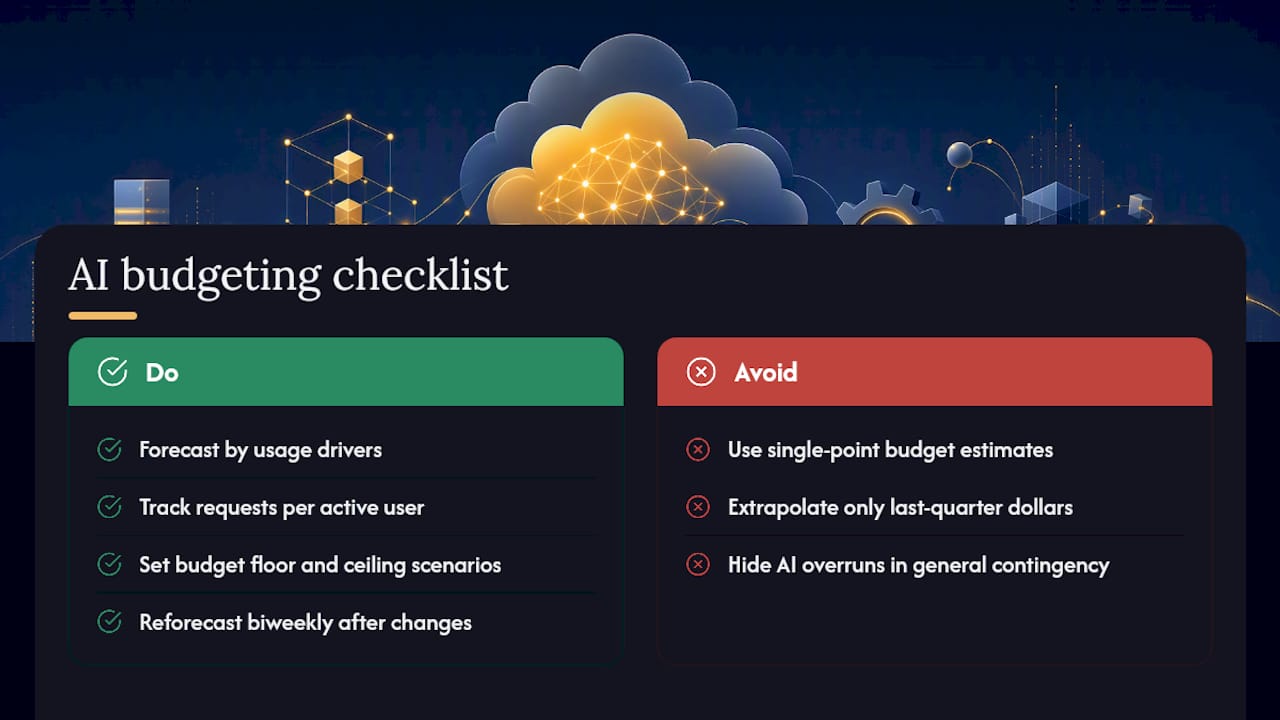
Build your forecast around usage drivers, not historical dollar totals. Track requests per active user, average tokens per request, and your model mix, then project spend by multiplying those drivers against expected user growth. This catches cost spikes a flat dollar-based forecast misses entirely, because it’s usage behavior, not raw spend, that actually shifts month to month.
Set budget bands rather than single point estimates. Because agent workflows can multiply calls unpredictably, a wide range, say a floor and a ceiling scenario, gives finance a realistic picture instead of a number that gets blown through in week two of the month.
Reforecast on a shorter cycle than your traditional cloud budget. Monthly reforecasting works for stable compute and storage spend. AI workloads often need a biweekly check-in, especially in the months right after a new feature or model upgrade ships, since usage patterns take time to stabilize.
Build in a contingency line explicitly labeled for AI cost variance, separate from your general cloud contingency. This makes overruns visible as an AI-specific line item finance can track, rather than a number buried inside a general “cloud overage” category that hides which workload actually caused it.
Why most teams get AI cost optimization backward
The conventional advice treats AI cost optimization as a shopping exercise: find a cheaper model, negotiate better rates, switch providers. That advice isn’t wrong, exactly. It’s just aimed at the smallest lever available.
The real cost driver in most organizations isn’t model pricing. It’s the absence of visibility. Teams can’t optimize what they can’t attribute to a specific model, agent, or workflow, and most invoice-level dashboards were never built for that level of granularity. Azure’s own research on agent economics makes the point plainly: agentic AI multiplies calls per request in ways that make governance, not discounting, the actual lever that matters.
What gets underrated is how much of this work is organizational rather than technical. Tagging discipline, budget ownership, and a shared measurement standard like FOCUS do more for your bill than swapping to a marginally cheaper model tier. What gets overrated is the idea that a single infrastructure change, quantization or spot instances, solves the problem on its own. Those levers help. They don’t replace the plumbing.
If you prioritize one thing first, prioritize attribution. Everything else, routing, caching, right-sizing, only works once you know exactly where the money is going.
— Aaditya Parashar
Get a pay-on-savings AI cost review from Cost Beacon
Cost Beacon runs the exact sequence covered here, without pulling your engineers off their roadmap for weeks. A senior engineer pairs AI-driven analytics with hands-on review of your AWS, GCP, Azure, or Kubernetes environment, then hands you a prioritized action plan with expected savings listed per item, not a vague summary deck.
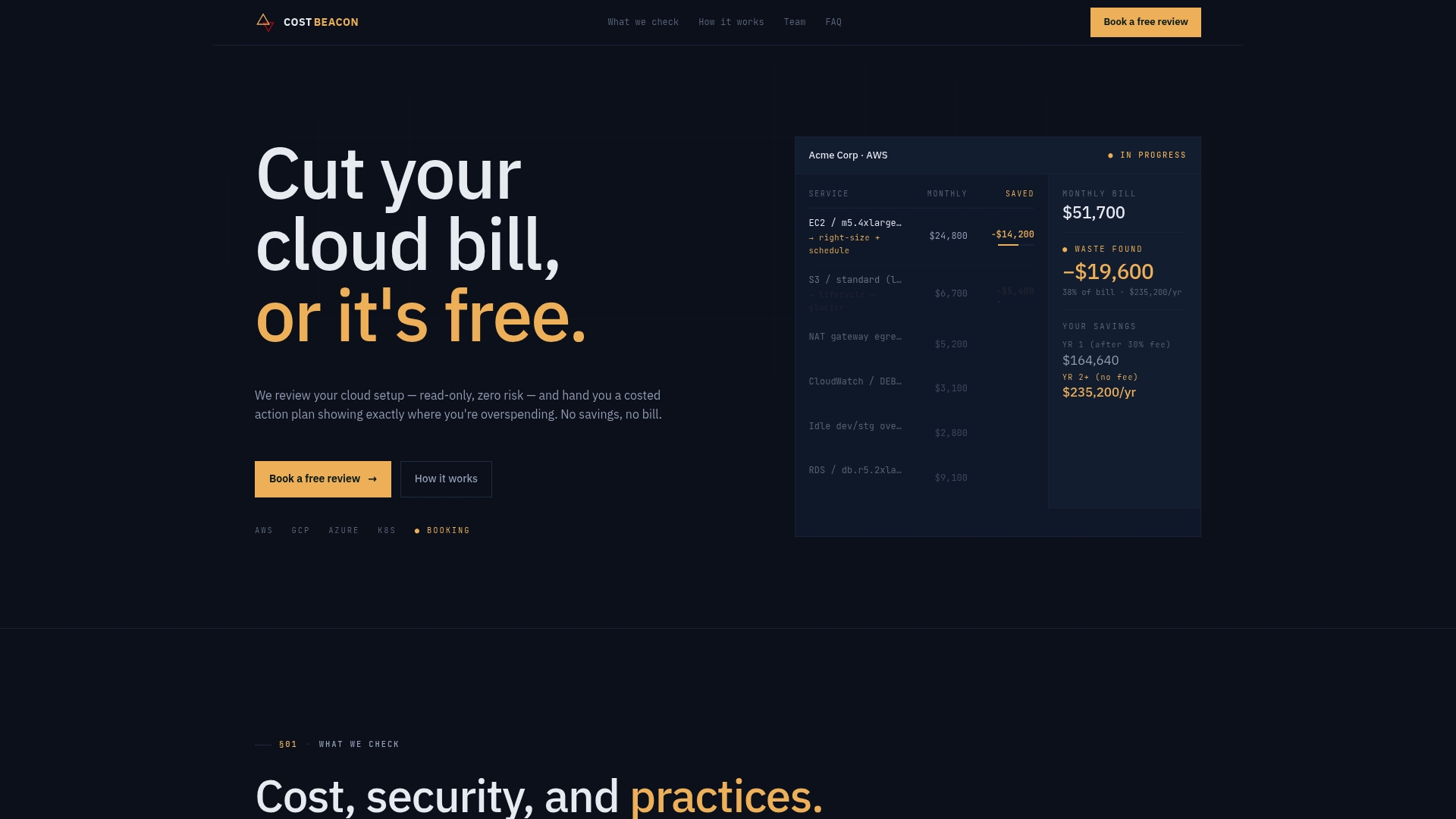
The first meeting is a discovery call to scope your environment and flag likely savings areas before any commitment. Clients have seen meaningful bill reductions across fintech, telecom, and other industries, and Cost Beacon only invoices a percentage of savings you actually realize. No upfront fee, no retainer, no cost if nothing gets found. If your team wants a second set of eyes on model routing, GPU sizing, or storage waste before committing engineering hours internally, start a pay-on-savings review with Cost Beacon and get a prioritized plan back before you spend another cycle guessing where the money is going.
Sources
Recommended
Aaditya works on cloud cost and platform engineering at Cost Beacon, mostly on AWS and Kubernetes estates that grew faster than anyone planned for.
 Cost Beacon